
How to create a Callback form using the Ozeki C# SIP VoIP softphone source
 |
Download: | callback-form.zip |
This article introduces how to create a Callback form using the Ozeki C# SIP VoIP softphone source. These are small tips to help you in developing Callback form application code quickly. While developing the Callback form, many times you need some code to copy and paste to make your development fast.
What is a Callback form? When does it needed?
If a business is involved in selling products or services, there should be a website for this purpose (representing the products, the services, the company etc.). For providing more appropriate information for customers it is possible to contact them via telephone. Live conversations have their own advantages. You can interact with customers and give the right answers according to their interests. For this purpose introducing a Callback form is a good idea.
You can place a callback form to your website. In this way, website visitors can fill the query form, provide a summary of the products/services they are interested in and enter their phone number. Therefore, their request can be directed to one of the experienced sales/support engineers.
How to implement Callback Form using C#?
When the Callback form is filled, Ozeki VoIP SIP SDK calls the intended operator and the person who needs information at the same time. If both calls are accepted, then the SDK connects the two lines. In this way, the operator and the person who needs information can talk to each other.
First of all, you need to have Visual Studio Installed, and Ozeki VoIP SIP SDK downloaded and installed.
What configuration steps should be made?
This configuration guide helps you setup a a Callback form using the Ozeki C# SIP VoIP softphone source.
- Download and extract the sample program.
- Load the sample program to Visual Studio 2010 or to .Net compatible development environment.
-
Only a minimal configuration is needed to setup the example efficiently.
In the telephone initialization section of the FormCallback.cs file you need to replace the local IP address of the PC on which the system runs instead of "your local IP Address". Below you can find this step in details. This is the telephone initialization section of the FormCallback.cs file:private void InitializeSoftPhone() { try { var account = new SIPAccount(true, "oz875", "oz875", "oz875", "oz875", "192.168.115.103", 5060); softPhone = SoftPhoneFactory.CreateSoftPhone(SoftPhoneFactory.GetLocalIP(), 5700, 5750); softPhone.IncomingCall += softPhone_IncomingCall; phoneLine = softPhone.CreatePhoneLine(account); phoneLine.RegistrationStateChanged += phoneLine_PhoneLineInformation; softPhone.RegisterPhoneLine(phoneLine); connector.Connect(operatorReceiver, customerSender); connector.Connect(customerReceiver, operatorSender); } catch (Exception ex) { // } }In this section search for the following line:softPhone = SoftPhoneFactory.CreateSoftPhone("your local IP Address", 5700, 5750);In this line replace the local IP address of the PC on which the system runs instead of "your local IP Address".
As a next step you also need to provide the user data of your selected SIP PBX as the SIP account object values. Then you need to provide the user data of your selected SIP PBX as the SIP account object values similarly to the following line:phoneLine = softPhone.CreatePhoneLine(new SIPAccount(true, "oz891", "oz891", "oz891", "oz891", "192.168.91.212", 5060));
- Finally, you only need to build and run the program.
Graphical User Interface (GUI)
The sample program has the well-known MS Windows Forms Graphical User Interface (Figure 1). In the upper section of the GUI the status of the given SIP users is displayed. On the interface, it is possible to enter the time of callback and two telephone numbers. By clicking on the "Add request" button you can finalize the callback request. The "Events" section informs about the connection of the two parties.
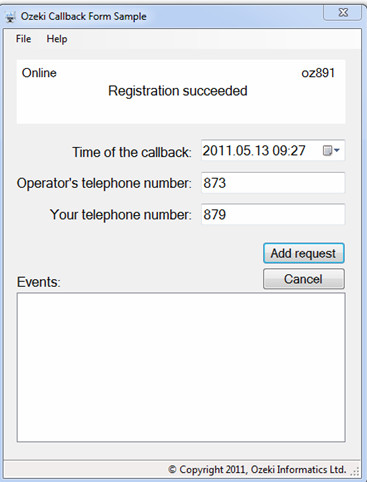
Running the Callback application
After the program is started, it will automatically try to register the SIP user in the SIP PBX. If the registration is successful, you can see "Registration succeeded" notice. From this point the program is ready to work. You can enter a future date, when this pre-entered date is come the program will call the phone number of the operator.
If this call is accepted then the program also calls the customer who required callback. If the customer also accepts the call, the program transfers the audio data between the two parties (in other words, the two participants are connected).
If one of the participants hangs up the call or the call is never established, the call toward the other participant is automatically ended.
Callback example in C#
FormCallback.cs code-behind file includes events related to the interface and connects the GUI with the logic. The sample program is simple and representative that is why it does not include development samples and other convention usage. Therefore, the FormCallback.cs file includes the whole logic of the sample program. If you open this file, you can see a few lines of declaration that are needed to connect two call lines:
public partial class FormCallback : Form
{
    const bool OperatorCall = false;
    const bool CustomerCall = true;
    ISoftPhone softPhone;
    IPhoneLine phoneLine;
    PhoneLineState phoneLineInformation;
    IPhoneCall calloperator;
    IPhoneCall callcustumer;
    Timer countDownTimer;

    private PhoneCallAudioSender operatorSender = new PhoneCallAudioSender();
    private PhoneCallAudioReceiver operatorReceiver = new PhoneCallAudioReceiver();
    private PhoneCallAudioSender customerSender = new PhoneCallAudioSender();
    private PhoneCallAudioReceiver customerReceiver = new PhoneCallAudioReceiver();
    private MediaConnector connector = new MediaConnector();
OperatorCall/CustomerCall: they are constants that notifies about the direction of calls.
ISoftPhone: it demonstrates a telephone and its telephone line is represented by the IPhoneLine. A softphone can have more telephone lines, however, this example has one telephone line for making it simpler.
IPhoneLine: it represents a telephone line that can be registered in a SIP PBX, e.g. Asterisk, 3CX or other PBXs provided by free SIP services providers. The telephone line is registered in the SIP PBX via a SIP account.
PhoneLineState: this is an enum type that represents the status of the telephone line regarding the PBX e.g.: registered, unregistered, successful/unsuccessful registration etc.
IPhoneCall: it represents a phone call. It describes the status and the direction of the call, informs about which phone line the call is established on, who the called party is etc.
MediaConnector: class for creating connections between 'VoIPMediaHandler' objects.
PhoneCallAudioSender: it can send audio data to the attached 'IPhoneCall' object.
PhoneCallMediaReceiver: it can receive media data from the attached 'IPhoneCall' object.
Softphone initialization (after loading the GUI): with the "Load" event (typical for Windows Forms windows), I can make the program connected and registered to the SIP PBX by calling InitializeSoftPhone:
		private void InitializeSoftPhone()
        {
            try
            {
                var account = new SIPAccount(true, "oz875", "oz875", "oz875", "oz875", "192.168.115.103", 5060);
                softPhone = SoftPhoneFactory.CreateSoftPhone(SoftPhoneFactory.GetLocalIP(), 5700, 5750);
                softPhone.IncomingCall += softPhone_IncomingCall;
                phoneLine = softPhone.CreatePhoneLine(account);
                phoneLine.RegistrationStateChanged += phoneLine_PhoneLineInformation;

                softPhone.RegisterPhoneLine(phoneLine);

                connector.Connect(operatorReceiver, customerSender);
                connector.Connect(customerReceiver, operatorSender);
            }
            catch (Exception ex)
            {
                MessageBox.Show(String.Format("You didn't give your local IP adress, so the program won't run properly.\n {0}", ex.Message), string.Empty, MessageBoxButtons.OK,
                MessageBoxIcon.Error);

                var sb = new StringBuilder();
                sb.AppendLine("Some error happened.");
                sb.AppendLine();
                sb.AppendLine("Exception:");
                sb.AppendLine(ex.Message);
                sb.AppendLine();
                if(ex.InnerException != null)
                {
                    sb.AppendLine("Inner Exception:");
                    sb.AppendLine(ex.InnerException.Message);
                    sb.AppendLine();
                }
                sb.AppendLine("StackTrace:");
                sb.AppendLine(ex.StackTrace);

                MessageBox.Show(sb.ToString());
            }
        }
Here, you need to create an instance of the telephone via the "softPhone" object. Specify the IP address of the computer and the port domain that can be used by the softphone. The last parameter should be the port that listens to SIP messages coming from the PBX.
Subscribe to the event of your telephone that handles incoming calls (softPhone.IncomingCall). It is generated by incoming calls from remote users. In this sample program, incoming calls have no any roles in this way they will be automatically rejected.
Now create a phoneline with a SIP account that can be a user account of your corporate SIP PBX or a free SIP service provider account. To be able to display the created phoneline status, subscribe to its "phoneLine.PhoneLineInformation" event.
Then you only need to register the created "phoneLine" to your "softPhone". In this example, one phoneline is registered but, of course, more phonelines can also be registered. After these steps you only need to work with call handling and displaying calls on the GUI.
How to connect calls?
For connecting two calls, it is required to establish two successful calls with the two given telephone numbers (The call is successful if it is accepted by the called party). First, the operator is called and if the call is successful, the customer is also called. When the two calls are connected the audio data are transferred between the two participants by the sample program.
-
Initiate a call: initiation of calls is made in a set time instant.
I make the examination of this time instant with the help of the timer
offered by .Net Framework. This timer examines in every seconds if it is
the time for making the call. When it is time for call, the BeginCall(bool IsCustomerCall)
method is called. This method dials the operator
or the customer according to the value of the bool parameter. Meanwhile,
it informs us about this procedure on the user interface.
		private void BeginCall(bool IsCustomerCall)
		{
		    if (IsCustomerCall && !String.IsNullOrEmpty(textBoxCallbackPhone.Text))
		    {
		        callcustumer = softPhone.CreateCallObject(phoneLine, textBoxCallbackPhone.Text);
		        WireUpCallEvents(callcustumer);
		        InvokeGUIThread(() =>
		        {
		            listBoxEvents.Items.Add(String.Format("{0} call starts.", callcustumer));
		        });

		        customerReceiver.AttachToCall(callcustumer);
		        customerSender.AttachToCall(callcustumer);

		        callcustumer.Start();
		    }
		    else
		    {
		        if (string.IsNullOrEmpty(textBoxOperator.Text))
		            return;

		        if (phoneLineInformation != PhoneLineState.RegistrationSucceeded && phoneLineInformation != PhoneLineState.NoRegNeeded)
		        {
		            MessageBox.Show("Phone line state is not valid!");
		            return;
		        }

		        calloperator = softPhone.CreateCallObject(phoneLine, textBoxOperator.Text);
		        WireUpCallEvents(calloperator);
		        InvokeGUIThread(() =>
		        {
		            listBoxEvents.Items.Add(String.Format("{0} call starts.", calloperator));
		        });

		        operatorSender.AttachToCall(calloperator);
		        operatorReceiver.AttachToCall(calloperator);

		        calloperator.Start();
		    }
		}
To initiate a call, you need to create an "IPhoneCall" object representing a call by using teh "softPhone.Call" method and its parameters. The first parameter is the phone line via which you wish to initiate the call. The second parameter is the phone number to be called. To make a successful call, you need to subscribe to specific events. Therefore, the audio data and DTMF signals arriving from the remote end, or the changes of the call status can be processed efficiently. I made the subscription in the sample program as follows:private void WireUpCallEvents(IPhoneCall call) { call.CallStateChanged += (call_CallStateChanged); call.DtmfReceived += (call_DtmfReceived); }CallStateChanged: this event is for demonstrating the changes in the call status.
MediaDataRecived: the audio data from the remote telephone device arrives via this event.
DtmfReceived: this event is responsible for processing DTMF signals that are arrived from the remote end.
After subscribing for these necessary events you only need to actually initiate the call with the Start() method of the "call" object. In this sample program it is the "call.Start()" line. -
Handling of incoming calls: Ozeki VoIP SIP SDK publishes incoming
calls via "ISoftphone" "InComingCall" event. Since incoming calls are not
determined in the sample program, optional incoming calls are rejected immediately.
private void softPhone_IncomingCall(object sender, VoIPEventArgs<IPhoneCall> e) { e.Item.Reject(); } -
Displaying call status: regarding the call status, Ozeki VoIP SIP SDK
provides the following information: Ringing, InCall, Completed, Rejected etc.
These statuses are displayed via the "CallStateChanged" event of "call" object.
In this sample program I concentrated on the basic options. So the further
possibilities can be easily created based on these basic ones.
		private void call_CallStateChanged(object sender, CallStateChangedArgs e)
        {
            InvokeGUIThread(() =>
            {
                labelCallStateInfo.Text = e.State.ToString();
                listBoxEvents.Items.Add(String.Format("{0} call statechanged: {1}",sender,e.State.ToString()));
            });

            switch (e.State)
            {
                case CallState.Answered:
                    if ((IPhoneCall)sender==calloperator)
                    {
                        BeginCall(CustomerCall);
                    }
                    break;
                case CallState.Completed:
                case CallState.Cancelled:
                    HangUpCall((IPhoneCall)sender);
                    calloperator = null;
                    callcustumer = null;
                    break;
            }
        }
In the code above you can see how the program reacts to the changes in the call event. In case of "Incall" status, if changes occur in the call object of the operator, the call is started toward the customer. If one of the calls is hanged up, the other call is also hanged up with HangupCall(IPhoneCall call) method. This will hang up the given call via the Stop() method of "IPhoneCall" object. -
Handling audio data sending and receiving:
		customerReceiver.AttachToCall(callcustumer);
		customerSender.AttachToCall(callcustumer);
-
Handling incoming DTMF signals: receiving DTMF signals works in
similar way as receiving audio data. The program forwards incoming signals
to the other call and displays the reference value of the DTMF signals
on the interface in the following way:
		private void call_DtmfReceived(object sender, VoIPEventArgs<DtmfInfo> e)
		{
		    DtmfInfo dtmfInfo = e.Item;

		    InvokeGUIThread(() =>
		    {
		        labelCallStateInfo.Text = String.Format("DTMF signal received: {0} ", dtmfInfo.Signal.Signal);
		        listBoxEvents.Items.Add(String.Format("{0} sended the following DTMF sign: {1}", sender, dtmfInfo.Signal.Signal));
		    });
		}