
How to develop Windows Forms softphone using Visual Basic .NET?
 |
Download: | windows-forms-softphone-vb-net.zip |
This page provides information on how to use the C# VoIP SIP source implementation of Ozeki VoIP SDK for creating a VB.Net Softphone. You can also find information about the utilization, configuration, and the source code of this sample program. Read them and be familiar with the versatile functions that are offered by Ozeki VoIP SIP SDK.
What is VB.Net? How to get started?
Visual Basic .NET (VB.NET) is an object-oriented computer programming language that can be viewed as an evolution of the classic Visual Basic (VB), implemented on the .NET Framework. Microsoft currently supplies two main editions of IDEs for developing in Visual Basic: Microsoft Visual Studio 2012, which is commercial software and Visual Basic Express Edition 2012, which is free of charge.
Ozeki VB.NET Softphone Sample is a sample program that is equipped with telephone functions. This sample program was developed for presentation purposes and it presents the essential and simple to use services of Ozeki VoIP SIP SDK. This sample program represents a single line phone that is able to forward and receive calls, to send and receive DTMF signals for navigating in IVR systems.
Ozeki Windows Forms Softphone example for VB.NET is a really handy and representative example that is based on Ozeki VoIP SIP SDK. It provides the opportunity to try out some functions of a VoIP softphone which you can build and develop according to your needs in VB.Net.
The sample program uses VoIP technology so you can use it to start and receive telephone calls. DTMF signals can also be sent or received with it and with these DTMF signals you can navigate in IVR systems. These are just a few functions that are offered by this sample program. There is a chance for you to develop your own softphone further based on this sample program and you can customize it according to your needs.
How to develop softphone using VB.Net
You can find here how to configure the C# VoIP SIP source implementation of Ozeki VoIP SDK for creating a VB.Net Softphone.
What configuration steps should be made?
- Download and extract the sample program.
- Load the sample program into Visual Studio.
-
For the proper operation of the program a minimal configuration is required:
In the telephone initialization section of the PhoneForm.vb file you need to replace the local IP address of the PC on which the system runs instead of "your local IP Address". Below you can find this step in details. This is the telephone initialization section of the PhoneForm.vb file:Private Sub InitializeSoftPhone() Try Dim ip As IPAddress = SoftPhoneFactory.GetLocalIP() softPhone = SoftPhoneFactory.CreateSoftPhone(ip, 5700, 5750) AddHandler softPhone.IncomingCall, New EventHandler(Of VoIPEventArgs(Of IPhoneCall))(AddressOf softPhone_IncommingCall) phoneLine = softPhone.CreatePhoneLine(New SIPAccount(True, "oz878", "oz878", "oz878", "oz878", "192.168.115.103", 5060)) AddHandler phoneLine.RegistrationStateChanged, New EventHandler(Of RegistrationStateChangedArgs)(AddressOf phoneLine_PhoneLineInformation) softPhone.RegisterPhoneLine(phoneLine) Catch ex As Exception MessageBox.Show("You didn't give your local IP adress, so the program won't run properly.") End Try End SubIn this section search for the following line:softPhone = SoftPhoneFactory.CreateSoftPhone("your local IP Address", 5700, 5750)In this line replace the local IP address of the PC on which the system runs instead of "your local IP Address".
Then you need to provide the user data of your selected SIP PBX as the SIP account object values similarly to the following line:phoneLine = softPhone.CreatePhoneLine(new SIPAccount(True, "oz891", "oz891", "oz891", "oz891", "192.168.91.212", 5060))
Where "true" is the registrationRequired parameter: this is a true value and it allows to receive calls (not just to initiate them) in case the registration is successful. (In case of "False" value registration, calls can only be initiated).
In the sample program "oz891" marks the SipAccount displayname, the username, the registername and the registerpassword.
The following two parameters are the IP address or domain address and the port of the SIP PBX. - When you are finished you only need to build and run the program.
Graphical User Interface
The GUI of this sample program has been developed with Microsoft Windows Forms technology. The reason for this is that it allows great flexibility regarding the appearance of the program.
The main goal of this sample program is to demonstrate the simple and convenient use of Ozeki SDK. It's recommended to create a simple but representative GUI (Figure 1) with basic telephone functions. The softphone has all the functions that are required for establishing phone calls effectively like make a call, receive a call, sending and receiving DTMF signals and display of call events on the interface.
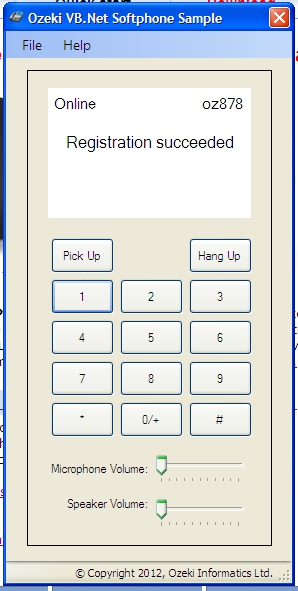
Running the program
After running the program the telephone automatically registers to the given SIP PBX with the given SIP account. If the registration process is ended successfully we can see Registration succeeded on the display. From this point the softphone is ready to establish and receive calls, to send and receive DTMF signals during calls for navigating in IVR systems. (The source code of the sample program includes settings that depend on the environment so after the download do not forget to customize it. For details please go to Configuration section).
Windows Forms softphone example in VB.Net
PhoneForm.vb code-behind file is belonging to the program interface describes the control events related to the interface and connects the GUI with the logics. The sample program focuses on simplicity and representativeness. The PhoneForm.vb file includes the full logic of the sample program. By opening this PhoneForm.vb file, you can see a few lines of declaration right the beginning that are needed for the use of Ozeki VoIP SIP SDK.
Public Class PhoneForm
' Fields
Private phoneCall As IPhoneCall
Private phoneLine As IPhoneLine
Private phoneLineInformation As PhoneLineState
Private softPhone As ISoftPhone
Private microphone As Microphone = microphone.GetDefaultDevice()
Private speaker As Speaker = speaker.GetDefaultDevice()
Private connector As MediaConnector = New MediaConnector
Private mediaReceiver As PhoneCallAudioReceiver = New PhoneCallAudioReceiver
Private mediaSender As PhoneCallAudioSender = New PhoneCallAudioSender
Private inComingCall As Boolean
ISoftPhone: it represents a telephone, and its telephone line is represented by the IPhoneLine. There can be more telephone lines which means that we can develop a multi line phone.
Iphoneline: it represents a telephone line that we can register to a SIP PBX for example, Asterisk, 3CX, or maybe to other PBXs that are offered by SIP providers. Registration happens through SIP account.
PhoneLineState: it is an enum type that represents the status of the telephone line with the PBX: e.g., registered, not registered, successful/unsuccessful registration.
IPhoneCall: it represents a call: the status of the call, the direction of the call, on which telephone line it was created, the called person, etc.
Microphone: class for capturing audio data with microphone.
Speaker: class for playing audio through speakers.
MediaConnector: class for creating connections between 'VoIPMediaHandler' objects.
PhoneCallAudioSender: it can send audio data to the attached 'IPhoneCall' object.
PhoneCallAudioReceiver: it can receive audio data from the attached 'IPhoneCall' object.
Softphone initializatoin (after loading the GUI)
By subscribing to the 'Loaded' event of Windows Form windows, it is possible to start the initialization and registration of Ozeki SDK softphone right after 'PhoneMain' window is loaded.
	    Private Sub InitializeSoftPhone()
	        Try
	            Dim ip As IPAddress = SoftPhoneFactory.GetLocalIP()
	            softPhone = SoftPhoneFactory.CreateSoftPhone(ip, 5700, 5750)
	            AddHandler softPhone.IncomingCall, New EventHandler(Of VoIPEventArgs(Of IPhoneCall))(AddressOf softPhone_IncommingCall)
	            phoneLine = softPhone.CreatePhoneLine(New SIPAccount(True, "oz878", "oz878", "oz878", "oz878", "192.168.115.103", 5060))
	            AddHandler phoneLine.RegistrationStateChanged, New EventHandler(Of RegistrationStateChangedArgs)(AddressOf phoneLine_PhoneLineInformation)
	            softPhone.RegisterPhoneLine(phoneLine)
	        Catch ex As Exception
	            MessageBox.Show("You didn't give your local IP adress, so the program won't run properly.")
	        End Try
	    End Sub
Create an instance of the phone via the "softPhone" object and give the IP address of your computer and the port domain that can be used by the phone. Finally specify the port, at which the SIM messages arriving from the PBX are listened, as the last parameter.
Subscribe to the event that handles incoming calls of the telephone ("softPhone.IncomingCall") that occurs when there is an incoming call from the remote end.
Create a phoneLine with a SIP account that can be the user account of your corporate SIP PBX or a free SIP provider account. To display the status of the created telephone line, sign up to its "phoneLine.RegistrationStateChanged" event.
When these things are done you only need to register the created "phoneLine" to the "softPhone". In this example only one telephone line is registered but of course multiple telephone line registration is also available.
After these steps you only need to deal with the handling of the calls and to display them onto the GUI.
Handlind the calls
Ozeki SDK represents the incoming and outgoing calls through IPhoneCall interface. This interface includes the status of the given call, on which line it was created and who is the called person. On this object we can pick up or hang up calls.
-
Handling outgoing calls: for establishing an outgoing call, enter
the number you wish to dial. Then click the 'Pick Up' button and the call
starts. The surface buttons are assigned to triggers so let's look at the
"Pick Up" button for details:
		Private Sub buttonPickUp_Click(ByVal sender As Object, ByVal e As EventArgs) Handles buttonPickUp.Click
	        If inComingCall Then
	            inComingCall = False
	            phoneCall.Answer()
	        ElseIf ((phoneCall Is Nothing) AndAlso Not String.IsNullOrEmpty(labelDialingNumber.Text)) Then
	            If ((phoneLineInformation <> RegState.RegistrationSucceeded) AndAlso (phoneLineInformation <> RegState.NoRegNeeded)) Then
	                MessageBox.Show("Phone line state is not valid!")
	            Else
	                phoneCall = Me.softPhone.CreateCallObject(phoneLine, labelDialingNumber.Text)
	                WireUpCallEvents()
	                phoneCall.Start()
	            End If
	        End If
	    End Sub
Since you can make and pick up the call with the very same button first you need to decide if it is an incoming or an outgoing call with the help of a simple bool variable truth verification (Incoming calls will be detailed later).
Before initiating a phone call, check if the phoneline has successfully registered to the server when registration is required. If an inappropriate result is returned the user is informed about the reason of the failure.
If the phoneline is registered, create a IPhoneCall object representing a call via the "softPhone.Call" method and its parameters. The first parameter is the telephone line on which we would like to initiate calls, the second parameter is the phone number to be called. In order to make your calls successful, wire up to some Call Events. Therefore, the audio data arriving from the remote end, the DTMF signal or changes in call status can be processed effectively. The wire up process is demonstrated in the sample as follows:Private Sub WireUpCallEvents() AddHandler phoneCall.CallStateChanged, New EventHandler(Of CallStateChangedArgs)(AddressOf phoneCall_CallStateChanged) AddHandler phoneCall.DtmfReceived, New EventHandler(Of VoIPEventArgs(Of DtmfInfo))(AddressOf phoneCall_DtmfReceived) End Sub
CallStateChanged: this event is for displaying the changes in the call status.
MediaDataRecived: the audio data from the remote end arrive via this event.
DtmfReceived: this event is responsible for processing DTMF signals arriving from the remote end.
To wire up to these necessary events you only need to actually start a call. You can do it with the Start() function of the call object. In this example it is the "call.Start()" line. -
Handling incoming calls: Ozeki VoIP SIP SDK publishes the incoming
calls through the "ISoftPhone" InComingCall event.
	Private Sub softPhone_IncommingCall(ByVal sender As Object, ByVal e As VoIPEventArgs(Of IPhoneCall))
		InvokeGUIThread(Sub()
	        labelCallStateInfo.Text = "Incoming call"
	        labelDialingNumber.Text = String.Format("from {0}", e.Item.DialInfo)
	        phoneCall = e.Item
	        WireUpCallEvents()
	        inComingCall = True
	    End Sub)
	End Sub
The code sample above is for handling this. It displays incoming calls on the display and registers onto the necessary events of the object representing incoming calls which was mentioned above. The incoming call variable notifies the Pick Up button if the call is an outgoing or an incoming one. -
Ending calls: there are three different ways for ending a call
that is in progress:
- the user (this softphone) ends the call
- the remote party ends the call
- there is a break in network connection (error occurs and ends the call)
If you use the "Hang Up" button the following event manager is responsible for ending the call:Private Sub buttonHangUp_Click(ByVal sender As Object, ByVal e As EventArgs) Handles buttonHangUp.Click If (Not phoneCall Is Nothing) Then If (phoneCall.CallState = CallState.Ringing AndAlso inComingCall) Then phoneCall.Reject() Else phoneCall.HangUp() End If inComingCall = False phoneCall = Nothing End If labelDialingNumber.Text = String.Empty End Sub
Now it needs to be checked if there is an active call. If there is an active call you need to end it and delete the information related to dialing. -
Displaying call status: Ozeki VoIP SIP SDK provides the following
information about the call status: ringing, InCall, Completed, Rejected etc.
These call statuses are displayed via the CallStateChange event of "call" object.
In this sample program I only focused on the essential options for being
simple but demonstrative. Based on these essential options you can easily
create further options.
		Private Sub phoneCall_CallStateChanged(ByVal sender As Object, ByVal e As CallStateChangedArgs)
	        InvokeGUIThread(Sub()
	                            labelCallStateInfo.Text = e.State.ToString
	                        End Sub)
	        Select Case e.State
	            Case CallState.Answered
	                microphone.Start()
	                connector.Connect(microphone, mediaSender)
	                speaker.Start()
	                connector.Connect(mediaReceiver, speaker)
	                mediaSender.AttachToCall(phoneCall)
	                mediaReceiver.AttachToCall(phoneCall)

	                Return
	            Case CallState.Completed
	                microphone.Stop()
	                connector.Disconnect(microphone, mediaSender)
	                speaker.Stop()
	                connector.Disconnect(mediaReceiver, speaker)
	                mediaSender.Detach()
	                mediaReceiver.Detach()
	                WireDownCallEvents()

	                phoneCall = Nothing
	                InvokeGUIThread(Sub()
	                                    labelDialingNumber.Text = String.Empty
	                                End Sub)
	                Return
	            Case CallState.Rejected
	                Exit Select
	            Case CallState.Cancelled
	                WireDownCallEvents()
	                phoneCall = Nothing
	                Exit Select
	            Case Else
	                Return
	        End Select
	    End Sub
The code above is only for reacting to the changes in the call status. For example: If the phone is picked up it starts the voice recording so we can send our audio data to the other party. Moreover it initializes the devices that are necessary for playing incoming audio data. - Handling incoming audio data: since you've wired up to the MediaDataReceived event of the "call" in case of both outgoing and incoming calls, the incoming PCM audio data only needs to be forwarded to the sound system as it is demonstrated below.
- Handling outgoing audio data: the PCM audio data originating from the microphone is forwarded to the "call" object that represents the actual call via the process of SendMediaData. Then audio data is compressed by Ozeki SIP SDK with the right audio codecs and then sent to the intended person according to the built communication channel.
-
Receiving DTMF signals: DTMF signals can be received similarly to
audio data. Regarding processing, this sample program only displays the
reference value of the received DTMF signal on the interface.
Private Sub phoneCall_DtmfReceived(ByVal sender As Object, ByVal e As VoIPEventArgs(Of DtmfInfo)) InvokeGUIThread(Sub() Me.labelCallStateInfo.Text = String.Format("DTMF signal received: {0} ", e.Item.Signal.Signal) End Sub) End Sub -
Sending DTMF signals: DTMF signals can be sent after the call is
established for - for example - navigating i n the IVR menu system of the
called call center. Ozeki VoIP SIP SDK allows to send DTMF signals in a
simple way: the "StartDTMFSignal" method is called in the object
representing the given call in the following way:
		Private Sub buttonKeyPad_MouseDown(ByVal sender As Object, ByVal e As MouseEventArgs) Handles button9.MouseDown, button8.MouseDown, button7.MouseDown, button6.MouseDown, button5.MouseDown, button4.MouseDown, button3.MouseDown, button2.MouseDown, button12.MouseDown, button11.MouseDown, button10.MouseDown, button1.MouseDown
			If ((Not phoneCall Is Nothing) AndAlso (phoneCall.CallState = CallState.InCall)) Then
			    Dim id As Integer
			    Dim btn As Button = TryCast(sender, Button)
			    If (((Not btn Is Nothing) AndAlso (Not btn.Tag Is Nothing)) AndAlso Integer.TryParse(btn.Tag.ToString, id)) Then
			        phoneCall.StartDTMFSignal(VoIPMediaType.Audio, id)
			    End If
			End If
		End Sub
According to RFC2833 the sending of the DTMF signal can represent how long the DTMF signal is being sent. In the sample program I would like to demonstrate this with the events of MouseDown and MouseUP buttons. By using MouseDown, the DTMF signal of the pressed button starts to be sent. By using MouseUP, the sending of the given DTMF signal is ended. The way of ending DTMF signal is similar to the way of start. On the object that represents the current call, the 'StopDTMFSignal' method is called in the following way (where the ID is the number-type DTMF signal according to the reference relating to the pressed button):phoneCall.StopDTMFSignal(VoIPMediaType.Audio, id)
-
Volume control: Ozeki VoIP SIP SDK provides the possibility for
controlling the volume of the microphone and the speaker. You can use a
Trackbar element on the GUI for this purpose and set the actual volume
according to the track bar value like in the following two functions.
The volume is set every time you change the state of the tracker on the certain Trackbar. This can be implemented easily in the event handler functions for the Trackbar objects (see the following code).Private Sub MicrophoneVolumeTrackbar_Scroll(ByVal sender As System.Object, ByVal e As System.EventArgs) Handles MicrophoneVolumeTrackbar.Scroll Dim volume As Single volume = MicrophoneVolumeTrackbar.Value / 100 microphone.Volume = volume End Sub Private Sub SpeakerVolumeTrackbar_Scroll(ByVal sender As System.Object, ByVal e As System.EventArgs) Handles SpeakerVolumeTrackbar.Scroll Dim volume As Single volume = SpeakerVolumeTrackbar.Value / 100 speaker.Volume = volume End Sub
The example program sets the speaker and microphone volume according to the state of the Trackbar trackers using percentage values, but you can also use the actual value of the tracker if you want. In that case you need to delete the "/ 100" section from the code.