
Introduction to Ozeki VoIP SIP SDK
Ozeki VoIP SIP SDK is a software development kit that allows you to make VoIP calls using SIP protocol. It can be easily included in any software developed in .Net. Read more details to discover the excellent features of this SIP SDK!
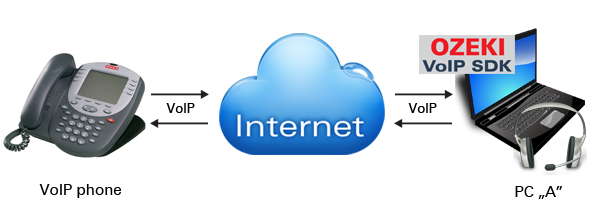
When you integrate Ozeki VoIP SIP SDK, your application will be capable of delivering crystal clear sound even for low and high-bandwidth users and SIP compatible devices (hardware and software). Superior voice quality is also guaranteed due to the digital voice processing features and the extended codec support.
The latest inbuilt features of Ozeki VoIP SIP SDK also provide support for video streaming. This means that you can create VoIP SIP solutions that are capable of video phoning too.
Ozeki VoIP SIP SDK is based on IETF standards (SIP, RTP, STUN, TURN, ICE etc.) so it is compatible with other standard based products (such as PBXs like Asterisk, 3CX, Cisco, etc. etc).
After downloading Ozeki VoIP SIP SDK you can create a C# softphone or a VB.net softphone in minutes or you can build SIP VoIP call services easily and quickly. It is really easy to incorporate Ozeki VoIP SIP SDK in your application. You just need to follow some simple configuration steps to get started.
Follow these simple and quick steps to make VoIP calls from your application instantly!
- Create a project in Visual Studio 2022 or 2019 to which you wish to add VoIP support
- Download and install Ozeki VoIP SIP SDK
- Select Add reference option and add ozeki.dll
- Specify the SIP account settings in the code
- Start VoIP calls from your application
That's easy! Try it now...
Outstanding functionalities...
Figure 1 demonstrates the functions available with Ozeki VoIP SIP SDK. After download you can customize this demo application according to your needs.
Download VoIP SIP SDK
The first thing to do if you wish to work with Ozeki VoIP SIP SDK, is to download and install it on your Windows computer. Once installed, you can use Visual Studio to add Voice and Video call capabilities to your project.
Link: Download Voip SIP SDK for Windows
In SIP Account Settings section you can specify the SIP account parameters. The following parameters need to be entered: User ID, Register Name, Register Password (these parameters are come from the service provider). You can also specify the Display Name, the Domain Server (it is the host or IP address of the service provider's SIP server) and the Outbound proxy.
Transport (TCP or UDP), ATA (Analog Telephone Adapter) Mode, Registration required and Logging options can also be checked. Finally, by clicking Register you can register your new SIP account.
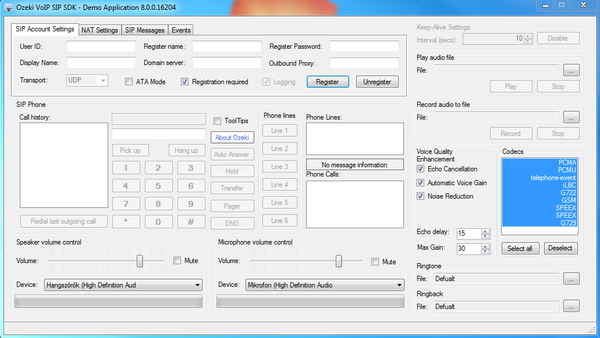
In SIP Phone section you can use the softphone efficiently and easily. The first field in this section is intended to display the call history and call status (Ringing, Calling, etc); while the second field shows the called phone number.
The keypad can be used for dialing phone numbers. The buttons next to the keypad enable you to Auto answer, Hold and Transfer the calls. Pager and Do Not Disturb (DND) functions are also available.
Next the registered phone lines can be listed in Phone lines section. You can refer to the first six lines with buttons (Line 1, Line 2, etc). This comfort function allows you to reach the first six lines with clicking a button.
It is also possible to make a couple of calls at once on a given phone line. In Phone calls section you can see the active phone calls on a given phone line. If there is no phone call, this section is empty.
The Speaker and Microphone volume can also be set in Speaker Volume Control and in Microphone Volume Control sections.
In Keep-Alive Settings section you can specify the keep-alive intervals in seconds for sending packets so that the used port will not close. This option is useful when Network address translation (NAT) is used. You can also Disable this function.
In Play audio file section you can browse for a file that you wish to be played during conversations. By clicking Play and Stop buttons you can play the file or you can stop playing.
In Record audio file section you can record phone conversations easily by clicking on Record. Clicking on Stop will stop recording.
For Voice quality enhancement you can enable Echo Cancellation, Automatic Voice Gain and Noise Reductions functions.
In Codecs section you can find the list of available codecs. It is possible to switch between codecs during the conversation.
Summary
Ozeki VoIP SIP SDK comes with all the necessary components to provide seamless and efficient VoIP services. Without spending time with learning SIP basics you can instantly start your project and boost the benefits of VoIP technology in your application. Start now in seconds and get a ready-to-use SDK! Download Ozeki VoIP SIP SDK and start to VoIP-empower your application!
Need assistance or have a question?
Do not hesitate to contact us! Send us an email right now: info@voip-sip-sdk.com