


Dialers
This article is a brief introduction about dialer programs implemented using Ozeki VoIP SIP SDK. After reading through this page you will be fully familiar with how to begin to develop dialers and autodialers.
What are dialers
A dialer (Figure 1) is a tool for dialing phone numbers. Physical telephone devices and softphones both have dialers for starting phone calls. There are manual and automatic dialers. You can press the phone buttons manually, digit by digit to finally shape the phone number you wish to call. Or, if you have previously input some phone numbers to the memory of the phone (or computer), you only have to press one single button in order to place a call. In this case, dialing is automatic.
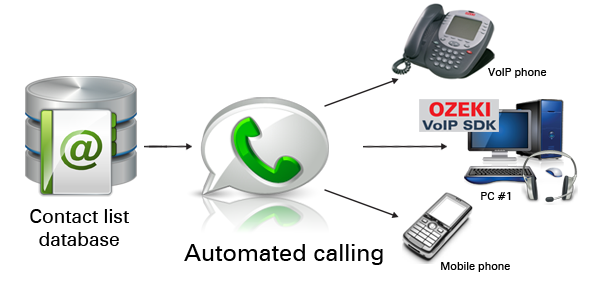
If there is need for dialing more (even thousands) of phone numbers at the same time, or one after another, an autodialer is used in most cases. An autodialer is a smart computer program which is based on a database of phone numbers. It automatically dials a list of numbers. Then, if the call is established and there is a human response, you can choose to play a prerecorded message or you can get one of your operators to talk with the customer.
Autodialers can be equipped with various kinds of capabilities. E.g. a smart autodialer is an autodialer capable of personalizing messages and collecting touch tone or speech feedbacks. A speech engine is usually included for converting text to speech and recognizing speech over the phone. A semi-automatic dialer is a human controlled dialer. All actions, such as dialing, playing audio message, recording, are initiated by human, normally by the press of a key. An enterprise grade dialer is an autodialer providing two key features. First, it is capable of making large number of simultaneous phone calls, second, it provides an application programming interface (API) for system integration.
Dialer implementation
If you choose Ozeki VoIP SIP SDK to develop dialers and autodialers, you choose one of the simplest and fastest ways for your purposes. The SDK provides great background support and functionalities to develop softphones for various tasks, and requires only basic programming knowledge. If you want to create a VoIP solution that has all the support to create dialers, you only need to download, install and use Ozeki VoIP SIP SDK.
Examples on implementation:
Summary
This article introduced you the basic knowledge about dialer solutions and showed how Ozeki VoIP SIP SDK can help you to fulfill your wishes about this topic. If you have read through this page carefully, you already have all the knowledge you need to start on your own solution.
If you have any question or need assistance, please contact us at info@voip-sip-sdk.com
Select a suitable Ozeki VoIP SIP SDK license for your project at: Pricing and licensing information
Related Pages
As you are now familiar with all the terms concerning this topic, now it is time to take a step further and explore what other extraordinary solution Ozeki VoIP SIP SDK can provide to you.
More information
- VoIP SIP Softphone
- How to implement voip dialer client in csharp
- Voip call assistant
- Voip call center client
- Voip call center server
- How to implement voip pbx systems in csharp
- How to implement voip ivr systems in csharp
- Voip webphone solution
- Voip conferencing systems
- How to implement voip voice recording system in csharp
- VoIP tunneling systems
- Voip security monitoring
- Voip mobile communication