


Call assistant
This article is a brief introduction about call assistant applications in relation with Ozeki VoIP SIP SDK.
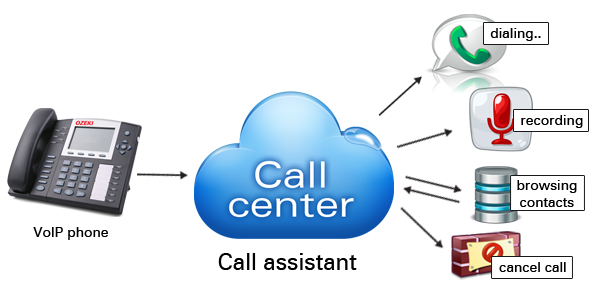
A call assistant (Figure 1) can be a collection of useful applications which can make your employees' work much easier. It is a rich feature set that provides maximum efficiency. Especially when you try to get your message to the masses.
With Ozeki VoIP SIP SDK you can build a unique call assistant application to be sold to your customers or used by your employees at your own company. You can choose from lots of features to be integrated in your VoIP solution. Below there are some functions and lists that can help the user of the call assistant.
- Dial function - The user can enter a phone number to call.
- Making a call - By only one button pressed, the dial starts automatically to the chosen phone number.
- Answering a call - By only one button pressed, the incoming call is picked up.
- Hold function - In case of more calls than free operators, call holding is the right option.
- Resume function - A function to take off hold. (This can be the same button as 'Hold'.)
- Transfer function - A call can be moved to another person or department, either as a blind transfer or attended transfer.
- Transfer cancellation - Cancel a transfer in progress.
- Active calls list- List of the calls in progress.
- Queue list - Listing the name of callers that are waiting in line.
- Auto attendant list - Listing all Auto Attendants. The user can transfer calls to specific Auto Attendants to assist the caller.
- Favorites - List of the most commonly used internal or external numbers.
Call assistant implementation
Ozeki VoIP SIP SDK provides a great background support for all the technologies and functionalities that are mentioned above in this article. If you want to create a VoIP solution that has all this support, you only need to download, install and use Ozeki VoIP SIP SDK.
Examples on implementation:
Summary
This article introduced you the basic knowledge about call assistant programs and showed how Ozeki VoIP SIP SDK can help you to fulfill your wishes about this topic. If you have read through this page carefully, you already have all the knowledge you need to start on your own solution.
If you have any questions or need assistance, please contact us at info@voip-sip-sdk.com
Select a suitable Ozeki VoIP SIP SDK license for your project at: Pricing and licensing information
Related Pages
As you are now familiar with all the terms concerning this topic, now it is time to take a step further and explore what other extraordinary solution Ozeki VoIP SIP SDK can provide to you.
More information
- VoIP SIP Softphone
- How to implement voip dialer client in csharp
- Voip call assistant
- Voip call center client
- Voip call center server
- How to implement voip pbx systems in csharp
- How to implement voip ivr systems in csharp
- Voip webphone solution
- Voip conferencing systems
- How to implement voip voice recording system in csharp
- VoIP tunneling systems
- Voip security monitoring
- Voip mobile communication