


Conferencing systems
This article is a brief introduction about conferencing systems. Due to its remarkable flexibility, Ozeki VoIP SIP SDK provides first-rate technology for achieving a decent VoIP conferencing system.
What you need to know about conferencing systems
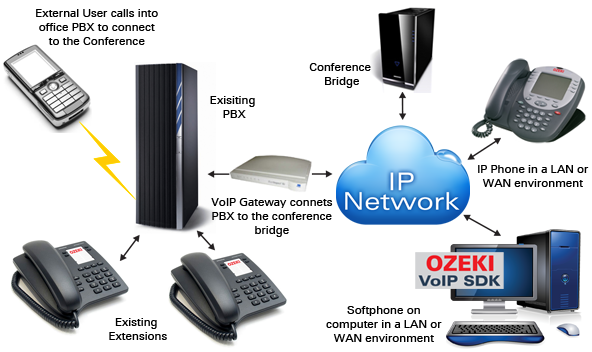
Organizing and taking part in conferences were always the best way to communicate with a group of competent people. In business life it is not unusual to travel through even continents to make an appearance on an important conference - but new ages have brought new methods. First, there was telephone conferencing. It is almost the same as a traditional conference meeting, but there might be some attendants (or all of them) who 'check in' from their own office (or anywhere) through a simple phone call. In these cases there is usually a central room or office, where the proper equipment is placed. Then all of the attendants join to the conversation and the conference can be started. Video conferencing is just the same but with monitors showing the participants' faces.
VoIP conferencing is only a slightly different. Its biggest advantages are the same as the advantages of VoIP technology itself over standard telephoning. Making a huge international meeting can cost a fortune to your company if having traditional phone systems. Using a VoIP conferencing system can decrease your costs significantly. This case, you can take advantage on the very favorable prices of international VoIP calls.
Conference call implementation
For making worthy VoIP conferences you will need to setup your powerful VoIP conferencing system. In order to enjoy all your desired functions, the best option is to build your own system for VoIP conferences. For this purpose, the advantageous Ozeki VoIP SIP SDK is recommended. After downloading Ozeki VoIP SIP SDK you can customize it to provide seamless and efficient VoIP services, without spending time with implementing SIP basics.
Examples on conference call implementation:
Summary
This article introduced you the basic knowledge for VoIP conferencing systems and showed that Ozeki VoIP SIP SDK can help you achieve all the required conferencing functionality for your system.
If you have any questions or need assistance, please contact us at info@voip-sip-sdk.com
Select a suitable Ozeki VoIP SIP SDK license for your project at: Pricing and licensing information
Related Pages
As you are now familiar with all the terms concerning this topic, now it is time to take a step further and explore what other extraordinary solution Ozeki VoIP SIP SDK can provide to you.
More information
- VoIP SIP Softphone
- How to implement voip dialer client in csharp
- Voip call assistant
- Voip call center client
- Voip call center server
- How to implement voip pbx systems in csharp
- How to implement voip ivr systems in csharp
- Voip webphone solution
- Voip conferencing systems
- How to implement voip voice recording system in csharp
- VoIP tunneling systems
- Voip security monitoring
- Voip mobile communication