


Multiple lines
Ozeki VoIP SIP SDK makes your work more efficient by providing excellent multiple phone line support. This guide ensures some introduction to create your own softphone with multi-line support. After reading this guide you can switch to the source code and explanation.
What are the multiple lines?
In SIP communication the phone line is directly related to the SIP account. A SIP phone line is represented by a SIP account that is registers to the PBX that is the SIP phone server. When a SIP phone registers to a PBX, it can use more than one SIP accounts for the registration (in case the phone supports this option).
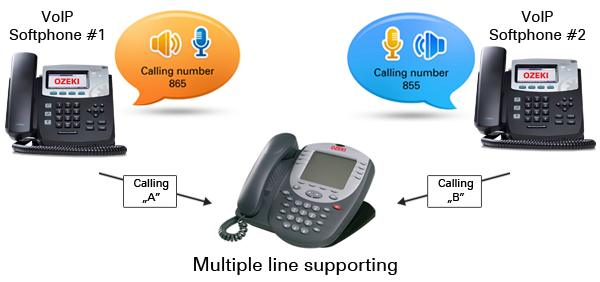
When a SIP telephone (standard phone or softphone) is registered to the PBX with more than one phone line, it can choose which line it wants to use for an outgoing call, and at the same time it can receive incoming calls on any of the registered lines.
Ozeki VoIP SIP SDK licenses can be configured by setting how many phone lines you can use in your solutions. For this purpose you can select a suitable Ozeki VoIP SIP SDK license on Licensing page.
In order to start developing your softphone with multiple line support using Ozeki SIP SDK, please visit How to manage multiple phone lines developer page.
This article introduced you the basic knowledge about multiple phone line support and showed how Ozeki VoIP SIP SDK can help you to fulfill your wishes about this topic.
As you are now familiar with all the terms concerning this topic, now it is time to take a step further and explore what other extraordinary solution Ozeki VoIP SIP SDK can provide to you.
You can select a suitable Ozeki VoIP SIP SDK license on Pricing and licensing information page
Related Pages
More information
- Voip multiple line support
- Multiple calls
- Voip video performance