


How to send audio data from microphone into a SIP voice call?
 |
Download: | sdk-microphone.zip |
This example demonstrates how to get microphone using c#, how to connect
media handlers and attach microphone to call, how to send microphone audio stream
into a call in c#, using Ozeki VoIP SIP SDK.
To fully understand this example, you might have to study the
How to register to a SIP PBX chapter and the
How to ring a SIP extension chapter first.
To use this example, you need to have Ozeki VoIP SIP SDK installed,
and a reference to ozeki.dll should be added to your visual studio project.
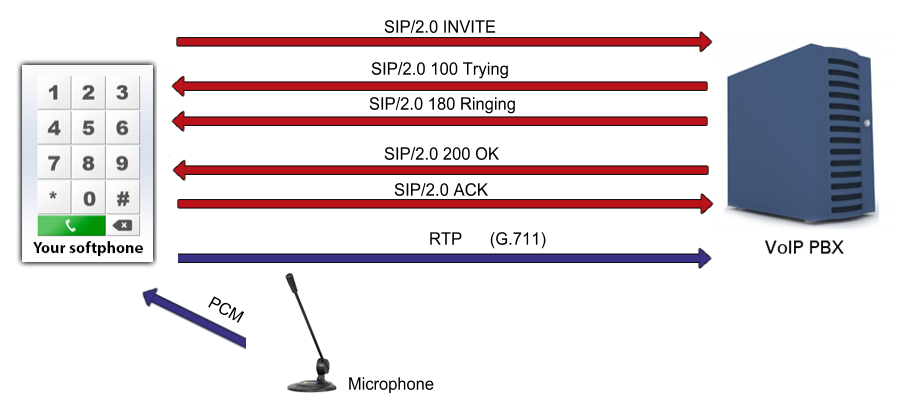
What is microphone used for during a SIP voice call? How does it work?
A microphone is an acoustic-to-electric transducer or sensor that
converts sound in air into an electrical signal. Microphones are used in many applications such as
telephones, hearing aids, live and recorded audio engineering, voice recording,
speech recognition, VoIP and much more.
Softphones are using microphones as audio sender devices for the purpose to capture microphone input and send the microphone audio stream to the other party (exspecially, to the other party's receiver device). To be able to do this, an analog-to-digital converter device converts the continuous physical quantity to digital numbers, that represent the quantity's amplitude, and can be processed by the c# softphone.
How to access microphone and send audio stream using c#?
Ozeki VoIP SIP SDK provides c# Microphone class for the purpose to create microphone object, which is able to handle the microphone amplitude, microphone input level, microphone volume etc. With this c# virtual microphone, users are able to access the microphone and get the microphone stream, can control microphone values, and also able to attach it to a call with the correct media sender object, to send the captured microphone input to the other party.
Connect microphone to call example in C#
using System;
using Ozeki.Media;
using Ozeki.VoIP;

namespace SDK_Microphone
{
    class Program
    {
        static ISoftPhone softphone;   // softphone object
        static IPhoneLine phoneLine;   // phoneline object
        static IPhoneCall call;
        static Microphone microphone;
        static MediaConnector connector;
        static PhoneCallAudioSender mediaSender;

        private static void Main(string[] args)
        {
            // Create a softphone object with RTP port range 5000-10000
            softphone = SoftPhoneFactory.CreateSoftPhone(5000, 10000);

            // SIP account registration data, (supplied by your VoIP service provider)
            var registrationRequired = true;
            var userName = "858";
            var displayName = "858";
            var authenticationId = "858";
            var registerPassword = "858";
            var domainHost = "192.168.115.100";
            var domainPort = 5060;

            var account = new SIPAccount(registrationRequired, displayName, userName, authenticationId, registerPassword, domainHost, domainPort);

            // Send SIP regitration request
            RegisterAccount(account);

            microphone = Microphone.GetDefaultDevice();
            mediaSender = new PhoneCallAudioSender();
            connector = new MediaConnector();

            // Prevents the termination of the application
            Console.ReadLine();
        }

        static void RegisterAccount(SIPAccount account)
        {
            try
            {
                phoneLine = softphone.CreatePhoneLine(account);
                phoneLine.RegistrationStateChanged += line_RegStateChanged;
                softphone.RegisterPhoneLine(phoneLine);
            }
            catch (Exception ex)
            {
                Console.WriteLine("Error during SIP registration: " + ex);
            }
        }

        static void line_RegStateChanged(object sender, RegistrationStateChangedArgs e)
        {
            if (e.State == RegState.Error || e.State == RegState.NotRegistered)
                Console.WriteLine("Registration failed!");

            if (e.State == RegState.RegistrationSucceeded)
            {
                Console.WriteLine("Registration succeeded - Online!");
                CreateCall();
            }
        }

        static void CreateCall()
        {
            var numberToDial = "853";

            call = softphone.CreateCallObject(phoneLine, numberToDial);
            call.CallStateChanged += call_CallStateChanged;
            call.Start();
        }

        static void SetupMicrophone()
        {
            connector.Connect(microphone, mediaSender);
            mediaSender.AttachToCall(call);

            microphone.Start();

            Console.WriteLine("The microphone is functioning.");
        }

        static void call_CallStateChanged(object sender, CallStateChangedArgs e)
        {
            Console.WriteLine("Call state: {0}.", e.State);

            if (e.State == CallState.Answered)
                SetupMicrophone();
        }
    }
}
Communication through the network
When the call has been accepted by the called party, the softphone is ready to send the voice stream to the destination through the UDP network as RTP packages. This example also writes to the console that the microphone has been successfully started.
Step 1: the application notifies the user about the success of starting the microphone
The microphone is functioning.
Step 2: RTP packages are being sent to the destination (a sample package)
[Stream setup by SDP (frame 28)]
10.. .... = Version: RFC 1889 Version (2)
..0. .... = Padding: False
...0 .... = Extension: False
.... 0000 = Contributing source identifiers count: 0
1... .... = Marker: True
Payload type: ITU-T G.711 PCMU (0)
Sequence number: 7133
[Extended sequence number: 72669]
Timestamp: 85000
Synchronization Source identifier: 0x712f7356 (1898935126)
Payload: d55555545657545756565455575051575650515557515050...
Related Pages
More information
- How to build a softphone voip sip client
- Register to SIP PBX
- Voip softphone development
- How to encrypt voip sip calls with sip encryption
- How to encrypt voip sip calls with rtp encryption
- How to ring a sip extension csharp example for sip invite
- How to make a sip voice call using csharp
- Voip multiple phone lines
- How to send stream of voice data into call using csharp microphone
- How to receive voice from SIP voice call using csharp speaker
- How to make conference voice call using voip sip
- How to play an mp3 file into a voice call using csharp
- How to convert text to speech and play that into a call using csharp
- How to use Microsoft Speech Platform 11 for TTS and STT
- How to record voip sip voice call
- How to accept incoming call using csharp
- How to reject incoming call using csharp
- How to read Headset buttons using Bluetooth
- How to implement auto answer using csharp
- How to recognize incoming voice using speech to text conversion
- Voip forward call
- Voip blind transfer
- Voip attended transfer
- Voip do not disturb
- Voip call hold
- SIP Message Waiting Indication
- Voip DTMF signaling
- How to work with sip and sdp in voip sip calls
- How to work with rtp in voip sip calls
- How to make voip video calls in csharp
- Voip video codec
- Shows how to use SpeechToText Google API
- How to convert Text to Speech using C# and Google
- Azure Text-to-Speech