


How to transfer an incoming call using attended call transfer?
 |
Download: | attended-transfer.zip |
This article is a detailed guide about attended call transfer method in relation with Ozeki VoIP SIP SDK. To use this example, you need to have Ozeki VoIP SIP SDK installed, and a reference to ozeki.dll should be added to your visual studio project. It's also recommended to visit the SIP INVITE article before you begin to study how to perform attended call transfer.
What is the attended call transfer? When is it needed?
When an incoming call has to be transferred from the client that accepted it, for example in case of a call center, the transfer can be made by using blind transfer, when the call is forwarded to a randomly chosen end-point or by intentionally choosing a callee and notifying them about the transfer. This second method is called attended call transfer (Figure 1) and it is basically made when the caller asks for a special agent of some specialist to help them.
In case of an attended call transfer the call center agent who receives all the incoming calls chooses between the possible agents according to the caller's needs and calls the agent and tells about the transfer before actually performing it. Attended call transfers can be used for directing the caller to the agent that is the best qualified for solving the given problem.
How to attended transfer an incoming call using C#?
In case of an attended call transfer the simplest solution is to have a human operator who makes the transfer directly by user interaction. In this example the incoming call is accepted by a human operator who asks about the motive of the call. The operator then decides about the call transfer according to the answers the caller gives.
In this example the operator can type in the number of the end-point where the call will be transferred. The transfer itself is made the same way as in case of a blind transfer the only difference is that in this case the called number is get from the operator not from the transfer list and the operator calls the addressee of the transfers and talks to them before the transfer. This also means that the transfer needs two simultaneous calls to be performed.
When the operator wants to transfer a call, they call another party - the one they want to transfer the call to - and when they have agreed about the transfer, the operator chooses the call to transfer and exits the call. After that the line will only be established between the original caller and the end-point where the call was transferred to.
Attended transfer example in C#
using System;
using Ozeki.VoIP;

namespace Attended_transfer
{
    class Program
    {
        static ISoftPhone softphone;   // softphone object
        static IPhoneLine phoneLine;   // phoneline object
        static IPhoneCall call;
        static IPhoneCall call2;

        private static void Main(string[] args)
        {
            // Create a softphone object with RTP port range 5000-10000
            softphone = SoftPhoneFactory.CreateSoftPhone(5000, 10000);

            // SIP account registration data, (supplied by your VoIP service provider)
            var registrationRequired = true;
            var userName = "858";
            var displayName = "858";
            var authenticationId = "858";
            var registerPassword = "858";
            var domainHost = "192.168.115.100";
            var domainPort = 5060;

            var account = new SIPAccount(registrationRequired, displayName, userName, authenticationId, registerPassword, domainHost, domainPort);

            // Send SIP regitration request
            RegisterAccount(account);

            // Prevents the termination of the application
            Console.ReadLine();
        }

        static void RegisterAccount(SIPAccount account)
        {
            try
            {
                phoneLine = softphone.CreatePhoneLine(account);
                phoneLine.RegistrationStateChanged += line_RegStateChanged;
                softphone.IncomingCall += softphone_IncomingCall;
                softphone.RegisterPhoneLine(phoneLine);
            }
            catch (Exception ex)
            {
                Console.WriteLine("Error during SIP registration: " + ex);
            }
        }

        static void line_RegStateChanged(object sender, RegistrationStateChangedArgs e)
        {
            if (e.State == RegState.NotRegistered || e.State == RegState.Error)
                Console.WriteLine("Registration failed!");

            if (e.State == RegState.RegistrationSucceeded)
                Console.WriteLine("Registration succeeded - Online!");
        }

        // this method will be called, when an incoming call received
        static void softphone_IncomingCall(object sender, VoIPEventArgs<IPhoneCall> e)
        {
            call = e.Item;
            call.CallStateChanged += call_CallStateChanged; // subscribes to the event to get notified about the call's states
            call.Answer();  // accepts the call (sends back the 200 OK SIP message)
        }

        static void call_CallStateChanged(object sender, CallStateChangedArgs e)
        {
            Console.WriteLine("Call state: {0}.", e.State);

            if (e.State == CallState.Answered)
            {
                call2 = softphone.CreateCallObject(phoneLine, "895");
                call2.CallStateChanged += call2_CallStateChanged;
                call2.Start();
            }
        }

        private static void call2_CallStateChanged(object sender, CallStateChangedArgs e)
        {
            if (e.State == CallState.Answered)
            {
                call.AttendedTransfer(call2);
            }
        }
    }
}
Communication through the network
After the call has been established between two parties, the blindtransfer can begin.
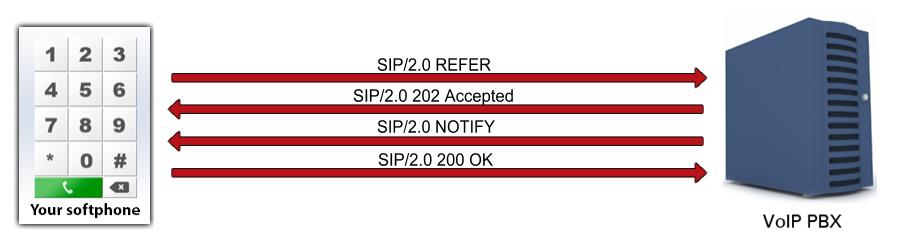
The transfer is done with REFER and NOTIFY SIP requests and the 202 Accepted sip message.
REFER sip request utilizes the Refer-To Header field to pass contact information
such as URI INFO provided in the request, and the 202 Accepted message
indicates that the request has been accepted for processing, but the processing has not been completed yet.
Sip NOTIFY message informs the subscriber of the state of the resource.
After the ACK message has been sent back as the acknowledgement of the succeeded SIP
INVITE, if the softphone tries to transfer the call (with attended transfer) to another party, it will automatically
put the call on hold first (as well as it will put the third party's call at later steps):
Step 1: The Softphone puts the first call on hold using the INVITE SIP request with the
correct media attributes.
You can read more about these few steps at the How to hold a call article.
Step 2: A call is being made to the third party with the SIP INVITE request.
To read more about call making, please visit the How to make a SIP voice call chapter.
Step 3: As in the case of Step 1, the call with the third party is being put on hold by sending the INVITE SIP request.
Step 4: The softphone sends the REFER SIP request to the first party, with the header information about the third one (UDP message, Softphone -> PBX)
REFER sip:1001@192.168.112.215:5060 SIP/2.0
Via: SIP/2.0/UDP 192.168.112.215:8242;
branch=z9hG4bKc2db304e-f3df-4f58-8f7d-7ddff90e656c;rport
To: "1001"<sip:1001@192.168.112.215:5060>;tag=hjlvfjuf
From: "1000"<sip:1000@192.168.112.215:5060>;tag=gulwxulc
CSeq: 3 REFER
Call-ID: bilpyrvlobgxxycbovknefiacohtrdusjammrbfsepsftwkwyt
Max-Forwards: 70
Contact: <sip:1000@192.168.112.215:8242>
User-Agent: Ozeki VoIP SIP SDK v10.1.8
Content-Length: 0
Refer-To: <sip:9999@192.168.112.215?Replaces=bcpunabirqfwrcqvdiledlhmmvejts
svfregssfjrpxnrrfedo%3Bto-tag%3Dpbiwdanp%3Bfrom-tag%3Dtpjgyoud>
Referred-By: "1000"<sip:1000@192.168.112.215:8242>
Step 5: The first party sends a 202 Accepted SIP message via the PBX to indicate the received request (UDP message, PBX -> Softphone)
SIP/2.0 202 Accepted
Via: SIP/2.0/UDP 192.168.112.215:8242;branch=z9hG4bK6a0988ed-e397-4493-add1-
bea199abc252;rport=8242;received=192.168.112.215
From: "1000"<sip:1000@192.168.112.215:5060>;tag=gulwxulc
Call-ID: bilpyrvlobgxxycbovknefiacohtrdusjammrbfsepsftwkwyt
CSeq: 4 REFER
To: "1001"<sip:1001@192.168.112.215:5060>;tag=hjlvfjuf
User-Agent: Ozeki Phone System XE v5.3.1
Content-Length: 0
Expires: 200
Step 6: The first party also sends NOTIFY SIP message to notify the softphone about it is trying to INVITE the third party (UDP message, PBX -> Softphone)
NOTIFY sip:1000@192.168.112.215:8242 SIP/2.0
Via: SIP/2.0/UDP 192.168.112.215:5060;branch=z9hG4bK1fb4b2a5-8b86-48e9-831f-
3102f8072982;rport
To: "1000"<sip:1000@192.168.112.215:5060>;tag=gulwxulc
From: "1001"<sip:1001@192.168.112.215:5060>;tag=hjlvfjuf
CSeq: 2 NOTIFY
Call-ID: bilpyrvlobgxxycbovknefiacohtrdusjammrbfsepsftwkwyt
Max-Forwards: 70
Contact: <sip:1000@192.168.112.215:8242>
User-Agent: Ozeki Phone System XE v5.3.1
Event: refer
Subscription-State: active;expires=200
Content-Type: message/sipfrag
Content-Length: 18

SIP/2.0 100 Trying
Step 7: The softphone sends a 200 OK SIP message to indicate, the NOTIFY SIP message has arrived (UDP message, Softphone -> PBX)
SIP/2.0 200 OK
Via: SIP/2.0/UDP 192.168.112.215:5060;branch=z9hG4bK1fb4b2a5-8b86-48e9-831f-
3102f8072982;rport=5060;received=192.168.112.215
From: "1001"<sip:1001@192.168.112.215:5060>;tag=hjlvfjuf
Call-ID: bilpyrvlobgxxycbovknefiacohtrdusjammrbfsepsftwkwyt
CSeq: 2 NOTIFY
To: "1000"<sip:1000@192.168.112.215:5060>;tag=gulwxulc
User-Agent: Ozeki VoIP SIP SDK v10.1.8
Content-Length: 0
Step 8: When the call has been established between the first and the third party, the third party sends a BYE SIP request to the softphone (UDP message, PBX -> Softphone)
BYE sip:1000@192.168.112.215:8242 SIP/2.0
Via: SIP/2.0/UDP 192.168.112.215:5060;branch=z9hG4bK88302393-c9cd-4074-bb2f-
74efec64c73c;rport
To: "1000"<sip:1000@192.168.112.215>;tag=tpjgyoud
From: <sip:9999@192.168.112.215>;tag=pbiwdanp
CSeq: 1 BYE
Call-ID: bcpunabirqfwrcqvdiledlhmmvejtssvfregssfjrpxnrrfedo
Max-Forwards: 70
Contact: <sip:1000@192.168.112.215:8242;rinstance=bf4e656de3820e49>
User-Agent: Ozeki Phone System XE v5.3.1
Content-Length: 0
Step 9: The softphone sends the SIP message 200 OK back (UDP message, Softphone -> PBX)
SIP/2.0 200 OK
Via: SIP/2.0/UDP 192.168.112.215:5060;branch=z9hG4bK88302393-c9cd-4074-bb2f-
74efec64c73c;rport=5060;received=192.168.112.215
From: <sip:9999@192.168.112.215>;tag=pbiwdanp
Call-ID: bcpunabirqfwrcqvdiledlhmmvejtssvfregssfjrpxnrrfedo
CSeq: 1 BYE
To: "1000"<sip:1000@192.168.112.215>;tag=tpjgyoud
User-Agent: Ozeki VoIP SIP SDK v10.1.8
Content-Length: 0
Step 10: The softphone also hangs up the call with the first party with the BYE request (UDP message, Softphone -> PBX)
BYE sip:1001@192.168.112.215:5060 SIP/2.0
Via: SIP/2.0/UDP 192.168.112.215:20386;branch=z9hG4bKc6ea6cce-7636-4ab2-9514-
ceef774acda3;rport
To: <sip:1000@192.168.112.215>;tag=tadhgfpn
From: "1001"<sip:1001@192.168.112.215>;tag=krgsfbkp
CSeq: 4 BYE
Call-ID: vbcsoppjbtysnostwssqbuqmxdpuiyiwreijpxlnhsdhfltiod
Max-Forwards: 70
Contact: <sip:1001@192.168.112.215:20386>
User-Agent: Ozeki VoIP SIP SDK v10.1.8
Content-Length: 0
Proxy-Authorization:Digest username="1001",realm="OzekiPBX",nonce="e2eb14d2830
74c2e99d29815f013939f",response="0da3c74c6ddc805349077b149f9a2019",
uri="sip:1001@192.168.112.215:5060",algorithm=MD5
Step 11: The first party sends a SIP message 200 OK to indicate the receivement of the disconnection (UDP message, PBX -> Softphone)
SIP/2.0 200 OK
Via: SIP/2.0/UDP 192.168.112.215:20386;branch=z9hG4bKc6ea6cce-7636-4ab2-9514-
ceef774acda3;rport=20386;received=192.168.112.215
From: "1001"<sip:1001@192.168.112.215>;tag=krgsfbkp
Call-ID: vbcsoppjbtysnostwssqbuqmxdpuiyiwreijpxlnhsdhfltiod
CSeq: 4 BYE
To: <sip:1000@192.168.112.215>;tag=tadhgfpn
User-Agent: Ozeki Phone System XE v5.3.1
Content-Length: 0
Related Pages
More information
- How to build a softphone voip sip client
- Register to SIP PBX
- Voip softphone development
- How to encrypt voip sip calls with sip encryption
- How to encrypt voip sip calls with rtp encryption
- How to ring a sip extension csharp example for sip invite
- How to make a sip voice call using csharp
- Voip multiple phone lines
- How to send stream of voice data into call using csharp microphone
- How to receive voice from SIP voice call using csharp speaker
- How to make conference voice call using voip sip
- How to play an mp3 file into a voice call using csharp
- How to convert text to speech and play that into a call using csharp
- How to use Microsoft Speech Platform 11 for TTS and STT
- How to record voip sip voice call
- How to accept incoming call using csharp
- How to reject incoming call using csharp
- How to read Headset buttons using Bluetooth
- How to implement auto answer using csharp
- How to recognize incoming voice using speech to text conversion
- Voip forward call
- Voip blind transfer
- Voip attended transfer
- Voip do not disturb
- Voip call hold
- SIP Message Waiting Indication
- Voip DTMF signaling
- How to work with sip and sdp in voip sip calls
- How to work with rtp in voip sip calls
- How to make voip video calls in csharp
- Voip video codec
- Shows how to use SpeechToText Google API
- How to convert Text to Speech using C# and Google
- Azure Text-to-Speech