
How to implement Auto Answer using C#?
 |
Download: | auto-answer.zip |
Developing Auto Answerer is a really easy task in C#, using Ozeki VoIP SIP SDK.
The application in this case is a softphone, which can accept calls and is able to
play previously captured audio files, read up text messages using Text-to-Speech into
the call and much more.
Plase note that, to fully understand this article, you might have to study the
How to accept incoming call and the
How to play mp3 into call chapters first.
To use this example, you need to have Ozeki VoIP SIP SDK installed,
and a reference to ozeki.dll should be added to your visual studio project.
What is Auto Answer? When is it needed?
Auto answerer is an application - softphone - which is able to receive SIP INVITE requests and accept incoming call, than do the previously set tasks; for example it can read up text message into the call by using text-to-speech, can play mp3 file into the call, send Instant Message to the caller and much more, whatever you implement to do.
Auto Answer feature is usually used at IVRs (Interactive Voice Response) and voicemails, and since it is a programmable application, you can even set different tasks for specified callers, phone numbers etc.
To learn more about how to accept incoming call automatically, how to play mp3 file into call, how to use convert text to speech, please visit the related pages at the bottom of this page.
How to implement Auto Answer function in C#?
Softphones, created by using Ozeki VoIP SIP SDK are able to get notified
about incoming calls by subscribing to the IncomingCall event of the
softphone object. When the event occurs, the call should be accepted, and the
softphone should listen to it's events to get notified about the call's state.
When the call's state changes to Answered call state, the application should begin
the previously set tasks.
Auto Answer example in C#
using System;
using Ozeki.VoIP;

namespace Auto_Answer
{
    class Program
    {
        static ISoftPhone softphone;   // softphone object
        static IPhoneLine phoneLine;   // phoneline object
        static IPhoneCall call;

        private static void Main(string[] args)
        {
            // Create a softphone object with RTP port range 5000-10000
            softphone = SoftPhoneFactory.CreateSoftPhone(5000, 10000);

            // SIP account registration data, (supplied by your VoIP service provider)
            var registrationRequired = true;
            var userName = "858";
            var displayName = "858";
            var authenticationId = "858";
            var registerPassword = "858";
            var domainHost = "192.168.115.100";
            var domainPort = 5060;

            var account = new SIPAccount(registrationRequired, displayName, userName, authenticationId, registerPassword, domainHost, domainPort);

            // Send SIP regitration request
            RegisterAccount(account);

            // Prevents the termination of the application
            Console.ReadLine();
        }

        static void RegisterAccount(SIPAccount account)
        {
            try
            {
                phoneLine = softphone.CreatePhoneLine(account);
                phoneLine.RegistrationStateChanged += line_RegStateChanged;
                softphone.IncomingCall += softphone_IncomingCall;
                softphone.RegisterPhoneLine(phoneLine);
            }
            catch (Exception ex)
            {
                Console.WriteLine("Error during SIP registration: " + ex);
            }
        }

        static void line_RegStateChanged(object sender, RegistrationStateChangedArgs e)
        {
            if (e.State == RegState.NotRegistered || e.State == RegState.Error)
                Console.WriteLine("Registration failed!");

            if (e.State == RegState.RegistrationSucceeded)
                Console.WriteLine("Registration succeeded - Online!");
        }

        // this method will be called, when an incoming call received
        static void softphone_IncomingCall(object sender, VoIPEventArgs<IPhoneCall> e)
        {
            call = e.Item;
            call.CallStateChanged += call_CallStateChanged; // subscribes to the event to get notified about the call's states
            call.Answer();  // accepts the call (sends back the 200 OK SIP message)
        }

        private static void Auto_Answer_Method()
        {
            Console.WriteLine("Auto Answer does its job."); // implementation of the Auto Answerer's job goes here
        }

        static void call_CallStateChanged(object sender, CallStateChangedArgs e)
        {
            Console.WriteLine("Call state: {0}.", e.State);

            if (e.State == CallState.Answered)
                Auto_Answer_Method();   // the call is being answered, the Auto Answerer can begin it's function
        }
    }
}
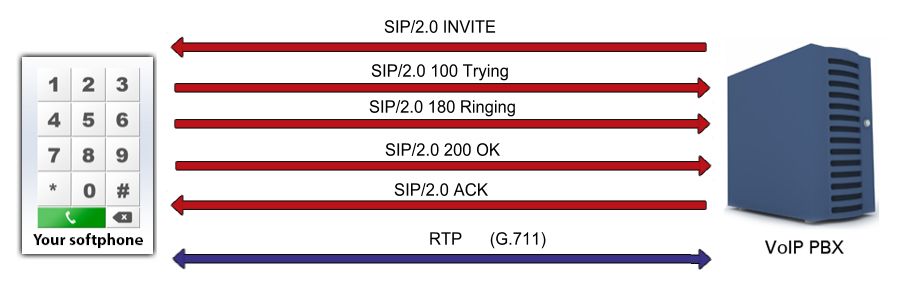
Communication through the network
When the INVITE sip message arrives to the softphone, it accepts the call,
so sends back the 200 OK SIP message is being sent
back as an answer sip message, to the caller via PBX.
After that, the softphone begins it's job, for example: sending voice data as RTP
packages.
Step 1: Invite request arrives from caller - via PBX (UDP message, PBX -> Softphone)
INVITE sip:1001@192.168.115.149:5060 SIP/2.0
Via: SIP/2.0/UDP 192.168.115.149:5060;branch=z9hG4bK24b44869-787c-4e81-9a09-
f1ac671ea55e;rport
To: "1001"<sip:1001@192.168.115.149:5060>
From: "1002"<sip:1002@192.168.115.149:5060>;tag=ocawjaug
CSeq: 1 INVITE
Call-ID: ptonnkjwqlbbgfjlicjmgbbtcyscfojewwbajojjvayupnpgyr
Max-Forwards: 70
Contact: <sip:1002@192.168.115.149:5060>
User-Agent: Ozeki Phone System XE v5.2.1
Content-Type: application/sdp
Content-Length: 292
Allow: INVITE, ACK, CANCEL, OPTIONS, BYE, REGISTER, SUBSCRIBE, NOTIFY, REFER, INFO,
MESSAGE

v=0
o=- 427857432 901610957 IN IP4 192.168.115.149
s=Ozeki Call
c=IN IP4 192.168.115.149
t=0 0
m=audio 5831 RTP/AVP 8 0 3 101 9
a=rtpmap:8 PCMA/8000
a=rtpmap:0 PCMU/8000
a=rtpmap:3 GSM/8000
a=rtpmap:101 telephone-event/8000
a=rtpmap:9 G722/8000
a=fmtp:9 bitrate=64000
a=sendrecv
Step 2: Reply status message to indicate that the softphone is trying to be ringed (UDP message, Softphone -> PBX)
SIP/2.0 100 Trying
Via: SIP/2.0/UDP 192.168.115.149:5060;branch=z9hG4bK24b44869-787c-4e81-9a09-
f1ac671ea55e;rport=5060;
received=192.168.115.149
From: "1002"<sip:1002@192.168.115.149:5060>;tag=ocawjaug
Call-ID: ptonnkjwqlbbgfjlicjmgbbtcyscfojewwbajojjvayupnpgyr
CSeq: 1 INVITE
To: "1001"<sip:1001@192.168.115.149:5060>
User-Agent: Ozeki VoIP SIP SDK v10.1.8
Content-Length: 0
Step 3: The called softphone accepts the call, which means a 200 OK sip reply (UDP message, Softphone -> PBX)
SIP/2.0 200 OK
Via: SIP/2.0/UDP 192.168.115.149:5060;branch=z9hG4bK24b44869-787c-4e81-9a09-
f1ac671ea55e;rport=5060;
received=192.168.115.149
From: "1002"<sip:1002@192.168.115.149:5060>;tag=ocawjaug
Call-ID: ptonnkjwqlbbgfjlicjmgbbtcyscfojewwbajojjvayupnpgyr
CSeq: 1 INVITE
To: "1001"<sip:1001@192.168.115.149:5060>;tag=qejeqrhm
User-Agent: Ozeki VoIP SIP SDK v10.1.8
Allow: INVITE, ACK, CANCEL, OPTIONS, BYE, SUBSCRIBE, NOTIFY, REFER, INFO, MESSAGE
Content-Type: application/sdp
Content-Length: 310
Contact: <sip:1001@192.168.115.149:7331>

v=0
o=- 1764809734 1764809734 IN IP4 192.168.115.149
s=Ozeki VoIP SIP SDK v10.1.8
c=IN IP4 192.168.115.149
t=0 0
m=audio 6778 RTP/AVP 8 0 3 101 9
a=rtpmap:8 PCMA/8000
a=rtpmap:0 PCMU/8000
a=rtpmap:3 GSM/8000
a=rtpmap:101 telephone-event/8000
a=rtpmap:9 G722/8000
a=fmtp:9 bitrate=64000
a=sendrecv
Step 4: The acknowledgement from the caller arrives via PBX (UDP message, Softphone -> Softphone)
ACK sip:1001@192.168.115.149:7331 SIP/2.0
Via: SIP/2.0/UDP 192.168.115.149:5060;branch=z9hG4bK189a886f-57b8-4b76-ba86-
275f7486696f;rport
To: "1001"<sip:1001@192.168.115.149:5060>;tag=qejeqrhm
From: "1002"<sip:1002@192.168.115.149:5060>;tag=ocawjaug
CSeq: 1 ACK
Call-ID: ptonnkjwqlbbgfjlicjmgbbtcyscfojewwbajojjvayupnpgyr
Max-Forwards: 70
Contact: <sip:1002@192.168.115.149:5060>
User-Agent: Ozeki Phone System XE v5.2.1
Content-Length: 0
Step 5: the communication is working with RTP packages (a sample package)
[Stream setup by SDP (frame 28)]
10.. .... = Version: RFC 1889 Version (2)
..0. .... = Padding: False
...0 .... = Extension: False
.... 0000 = Contributing source identifiers count: 0
1... .... = Marker: True
Payload type: ITU-T G.711 PCMU (0)
Sequence number: 7133
[Extended sequence number: 72669]
Timestamp: 85000
Synchronization Source identifier: 0x712f7356 (1898935126)
Payload: d55555545657545756565455575051575650515557515050...