


How to implement Do Not Disturb (DND) functionality?
 |
Download: | do-not-disturb.zip |
This article is a detailed guide about implementing the Do not Disturb functionality in relation with Ozeki VoIP SIP SDK. To use this example, you need to have Ozeki VoIP SIP SDK installed, and a reference to ozeki.dll should be added to your visual studio project. It's also recommended to visit the How to accept incoming call article before you begin to study how to perform the do not disturb functionality.
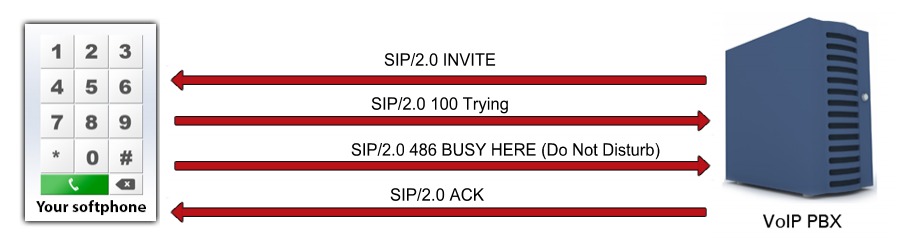
What is the do not disturb function? When is it needed?
There are cases when you do not want or do not have time for receiving phone calls. In VoIP communication there is a possibility to indicate this by using the Do not Disturb (DND) functionality (Figure 1).
DND indication can be implemented in more ways. The caller's client can show the presence information of the contacts or the DND can be only showed by sending an auto answer message about the fact that the callee does not want an incoming call.
How to implement do not disturb functionality using C#?
The DoNotDisturb is a simple flag related to the phone line. The SDK provides all the background for the DND function. If you set the DoNotDisturb flag to true, the incoming calls will be rejected by a busy signal.
Do not disturb example in C#
using System;
using Ozeki.VoIP;

namespace Do_Not_Disturb
{
    class Program
    {
        static ISoftPhone softphone;   // softphone object
        static IPhoneLine phoneLine;   // phoneline object
        static IPhoneCall call;

        private static void Main(string[] args)
        {
            // Create a softphone object with RTP port range 5000-10000
            softphone = SoftPhoneFactory.CreateSoftPhone(5000, 10000);

            // SIP account registration data, (supplied by your VoIP service provider)
            var registrationRequired = true;
            var userName = "858";
            var displayName = "858";
            var authenticationId = "858";
            var registerPassword = "858";
            var domainHost = "192.168.115.100";
            var domainPort = 5060;

            var account = new SIPAccount(registrationRequired, displayName, userName, authenticationId, registerPassword, domainHost, domainPort);

            // Send SIP regitration request
            RegisterAccount(account);

            // Prevents the termination of the application
            Console.ReadLine();
        }

        static void RegisterAccount(SIPAccount account)
        {
            try
            {
                phoneLine = softphone.CreatePhoneLine(account);
                phoneLine.DoNotDisturb = true;
                phoneLine.RegistrationStateChanged += line_RegStateChanged;
                softphone.IncomingCall += softphone_IncomingCall;
                softphone.RegisterPhoneLine(phoneLine);
            }
            catch (Exception ex)
            {
                Console.WriteLine("Error during SIP registration: " + ex);
            }
        }

        static void line_RegStateChanged(object sender, RegistrationStateChangedArgs e)
        {
            if (e.State == RegState.NotRegistered || e.State == RegState.Error)
                Console.WriteLine("Registration failed!");

            if (e.State == RegState.RegistrationSucceeded)
                Console.WriteLine("Registration succeeded - Online!");
        }

        // this method will be called, when an incoming call received
        static void softphone_IncomingCall(object sender, VoIPEventArgs<IPhoneCall> e)
        {
            call = e.Item;
            call.CallStateChanged += call_CallStateChanged; // subscribes to the event to get notified about the call's states
        }

        static void call_CallStateChanged(object sender, CallStateChangedArgs e)
        {
            Console.WriteLine("Call state: {0}.", e.State);
        }
    }
}
Communication through the network
When an incoming call is being noticed, the softphone sends the 486 Busy Here SIP message with a warning (399 "Do Not Disturb").
Step 1: INVITE request arrives via the PBX (UDP message, PBX -> Softphone)
INVITE sip:1000@192.168.112.215:5060 SIP/2.0
Via: SIP/2.0/UDP 192.168.112.215:5060;branch=z9hG4bK38a8f520-b36f-4cac-9d6c-
38b86dd76775;rport
To: "1000"<sip:1000@192.168.112.215:5060>
From: "1001"<sip:1001@192.168.112.215:5060>;tag=ebjadiwt
CSeq: 1 INVITE
Call-ID: ekixlqcwxgyxeuvtsfsxcexsecgmcoqxwdffgpwtouegqtlcpj
Max-Forwards: 70
Contact: <sip:1001@192.168.112.215:5060>
User-Agent: Ozeki Phone System XE v5.3.1
Content-Type: application/sdp
Content-Length: 294
Allow: INVITE, ACK, CANCEL, OPTIONS, BYE, REGISTER, SUBSCRIBE, NOTIFY, REFER,
INFO, MESSAGE

v=0
o=- 1929228100 1083675849 IN IP4 192.168.112.215
s=Ozeki Call
c=IN IP4 192.168.112.215
t=0 0
m=audio 6859 RTP/AVP 8 0 3 101 9
a=rtpmap:8 PCMA/8000
a=rtpmap:0 PCMU/8000
a=rtpmap:3 GSM/8000
a=rtpmap:101 telephone-event/8000
a=rtpmap:9 G722/8000
a=fmtp:9 bitrate=64000
a=sendrecv
Step 2: A 100 Trying SIP message is being sent back through the PBX (UDP message, Softphone -> PBX)
SIP/2.0 100 Trying
Via: SIP/2.0/UDP 192.168.112.215:5060;branch=z9hG4bK38a8f520-b36f-4cac-9d6c-
38b86dd76775;rport=5060;received=192.168.112.215
From: "1001"<sip:1001@192.168.112.215:5060>;tag=ebjadiwt
Call-ID: ekixlqcwxgyxeuvtsfsxcexsecgmcoqxwdffgpwtouegqtlcpj
CSeq: 1 INVITE
To: "1000"<sip:1000@192.168.112.215:5060>
User-Agent: Ozeki VoIP SIP SDK v10.1.8
Content-Length: 0
Step 3: The softphone rejects the call with 486 Busy Here sip message and a 399 "Do Not Disturb" warning (UDP message, Softphone -> PBX)
SIP/2.0 486 Busy Here
Via: SIP/2.0/UDP 192.168.112.215:5060;branch=z9hG4bK38a8f520-b36f-4cac-9d6c-
38b86dd76775;rport=5060;received=192.168.112.215
From: "1001"<sip:1001@192.168.112.215:5060>;tag=ebjadiwt
Call-ID: ekixlqcwxgyxeuvtsfsxcexsecgmcoqxwdffgpwtouegqtlcpj
CSeq: 1 INVITE
To: "1000"<sip:1000@192.168.112.215:5060>;tag=rtihgshq
User-Agent: Ozeki VoIP SIP SDK v10.1.8
Content-Length: 0
Warning: 399 ozsdk "Do Not Disturb"
Step 4: With an ACK sip message the other caller indicates through the PBX that the rejection has been received (UDP message, PBX -> Softphone)
ACK sip:1000@192.168.112.215:5060 SIP/2.0
Via: SIP/2.0/UDP 192.168.112.215:5060;branch=z9hG4bK38a8f520-b36f-4cac-9d6c-
38b86dd76775;rport
Call-ID: ekixlqcwxgyxeuvtsfsxcexsecgmcoqxwdffgpwtouegqtlcpj
From: "1001"<sip:1001@192.168.112.215:5060>;tag=ebjadiwt
To: "1000"<sip:1000@192.168.112.215:5060>;tag=rtihgshq
CSeq: 1 ACK
Max-Forwards: 70
Content-Length: 0
Related Pages
More information
- How to build a softphone voip sip client
- Register to SIP PBX
- Voip softphone development
- How to encrypt voip sip calls with sip encryption
- How to encrypt voip sip calls with rtp encryption
- How to ring a sip extension csharp example for sip invite
- How to make a sip voice call using csharp
- Voip multiple phone lines
- How to send stream of voice data into call using csharp microphone
- How to receive voice from SIP voice call using csharp speaker
- How to make conference voice call using voip sip
- How to play an mp3 file into a voice call using csharp
- How to convert text to speech and play that into a call using csharp
- How to use Microsoft Speech Platform 11 for TTS and STT
- How to record voip sip voice call
- How to accept incoming call using csharp
- How to reject incoming call using csharp
- How to read Headset buttons using Bluetooth
- How to implement auto answer using csharp
- How to recognize incoming voice using speech to text conversion
- Voip forward call
- Voip blind transfer
- Voip attended transfer
- Voip do not disturb
- Voip call hold
- SIP Message Waiting Indication
- Voip DTMF signaling
- How to work with sip and sdp in voip sip calls
- How to work with rtp in voip sip calls
- How to make voip video calls in csharp
- Voip video codec
- Shows how to use SpeechToText Google API
- How to convert Text to Speech using C# and Google
- Azure Text-to-Speech