


How to operate with SIP messages?
This article is a detailed guide about operating with incoming and outgoing SIP messages
in relation with Ozeki VoIP SIP SDK. After reading through this page you
will be fully familiar with all the essential terms concerning SIP messages
and what you will need for creating your own solution using Ozeki VoIP SIP SDK.
To use this example, you need to have Ozeki VoIP SIP SDK installed,
and a reference to ozeki.dll should be added to your visual studio project.
What are SIP messages?
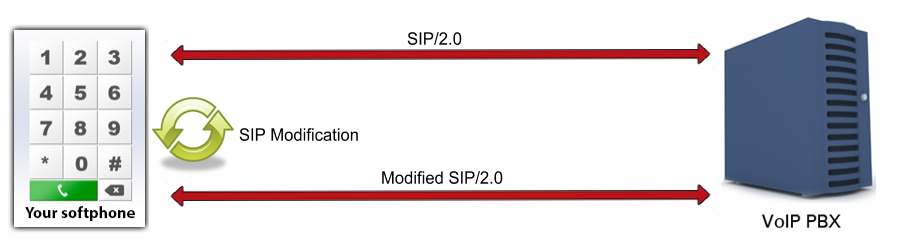
In VoIP communication system the calls are made by the support of a private branch exchange (PBX) that mainly uses SIP (session initiation protocol) messages for establishing the connection between two VoIP clients. These SIP messages can be modified in some cases when needed by the receiver clients.
To register to a PBX, to ring an other party, to accept or reject or even froward etc. a call, softphones are using SIP requests and messages. There are incoming messages and requests (which are coming from an other party through the PBX), and outgoing ones, which are going to the PBX to perform their tasks.
The cause for modifying SIP messages may vary but the method is the same for every case. Ozeki VoIP SIP SDK provides support for creating and modifying SIP messages directly from your VoIP program by calling some in built methods.
How to manipulate SIP message using C#?
To make the work easier Ozeki VoIP SIP SDK handles SIP messages, but also provides the opportunity to edit, manipulate them.
The SDK provides the ISIPMessageManipulator interface, which you can use up to create your own custom SIP message manipulator class. You have to implement three methods:
- ModifyIncomingMessage(): returns with a string, the modified incoming SIP message. To manipulate the incoming SIP messages, you have to edit the MessageModifierInfo typed value of this method, and return that after the modifications.
- ModifyOutgoingMessage(): returns with a string, the modified outgoing SIP message. You can modify the MessageModifierInfo typed value of this method for the purpose to modify the outgoing SIP message.
- PrepareAdditionalHeaders(): you can add extra headers to you SIP messages, this method will return with them.
Your softphone object has the SetSIPMessageManipulator() method, and after you have created
your own class and an instance of that, you have to give the instance to this method as a parameter.
From now, the softphone will manipulate the SIP messages, as they were set within the custom class.
SIP message manipulation in C#
At the developer side, the difference between the incoming and outgoing SIP message modification is in the edition of the modifier methods. If you edit the ModifyIncomingMessage() method, you'll manipulate the incoming SIP messages, and if you edit the ModifyOutgoingMessage() method, you will manipulate the outgoing SIP messages. You can find a well-detailed step-by-step guide with example about outgoing SIP message manipulation at the How to work with SIP and SDP article. You can learn from there how to modify SIP messages, and use that example to edit incoming SIP messages as well.
Related Pages
More information
- Voip multiple calls
- How to operate with sip message
- How to work with out of dialog sip instant message
- C# autodialer using the Ozeki VoIP SIP softphone source code
- C# SIP softphone example source code
- How to create a Callback form using the Ozeki C# SIP VoIP softphone source
- How to develop voip sip softphone using asp net
- C-sharp WPF softphone
- How to develop softphone using csharp Windows form
- How to develop Windows forms voip sip softphone using visual basic net
- How to develop voip sip softphone using cplusplus
- How to implement motion detection using Ozeki voip sip sdk in csharp
- How to manipulate SIP/SDP Messages using Ozeki VoIP SIP SDK