


 |
Download: | message-waiting-indication.zip |
This article is a detailed guide about implementing message waiting indication (MWI)
in relation with Ozeki VoIP SIP SDK. After reading through this page you will be
fully familiar with all the essential terms concerning MWI technology
and what you will need for creating your own solution using Ozeki VoIP SIP SDK.
To use this example, you need to have Ozeki VoIP SIP SDK installed,
and a reference to ozeki.dll should be added to your visual studio project.
It's also recommended to visit the SIP REGISTER article first.
What is Message Waiting Indication? How does it work?
The VoIP communication is basically used for the same purposes as the ordinary telephoning system. This means that the VoIP model contains all the functions a normal telephoning model has. Every analog communication device has its VoIP solution and this also stands for the answering machine.
The answering machine is a device that records the messages the callers leave when you cannot answer the call. It also has a display or some led lights to indicate that there are some messages waiting to listen to.
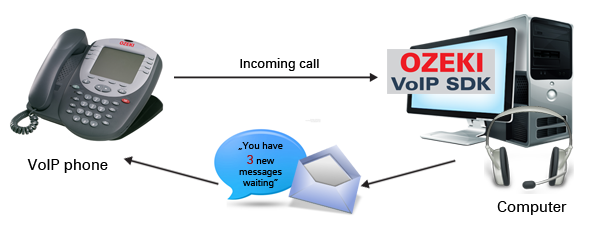
In VoIP solution there is also the possibility to implement message recording systems and they also need to have some notification methods for waiting messages (Figure 1).
How to make Message Waiting Indication using C#?
Ozeki VoIP SIP SDK handles the waiting SIP instant messages in the IPhoneLine interface. The message summary contains the sender information as well as the message itself in lines. If you want to be notified about a waiting SIP message your phone line object needs to be subscribed for the MessageSummaryReceived() event.
By implementing the phoneLine_MessageIndicationOccured event handler you can specify how the softphone will show the fact of a waiting SIP message (For example, you can put it on the GUI as a notification or pop-up a window).
Message Waiting Indication example in C#
using System;
using Ozeki.VoIP;

namespace Message_Waiting_Indication
{
    class Program
    {
        static ISoftPhone softphone;
        static IPhoneLine phoneLine;
        static ISIPSubscription mwiSubscription;

        static void Main(string[] args)
        {
            // Create a softphone object with RTP port range 5000-10000
            softphone = SoftPhoneFactory.CreateSoftPhone(5000, 10000);

            // SIP account registration data, (supplied by your VoIP service provider)
            var registrationRequired = true;
            var userName = "sipusername";
            var displayName = "sipdisplayname";
            var authenticationId = "authenticationid";
            var registerPassword = "Password";
            var domainHost = "pbxip.voipprovider.com";
            var domainPort = 5060;

            var account = new SIPAccount(registrationRequired, displayName, userName, authenticationId, registerPassword, domainHost, domainPort);

            // Send SIP regitration request
            RegisterAccount(account);

            // Prevents the termination of the application
            Console.ReadLine();
        }

        static void RegisterAccount(SIPAccount account)
        {
            try
            {
                phoneLine = softphone.CreatePhoneLine(account);
                phoneLine.RegistrationStateChanged += sipAccount_RegStateChanged;
                softphone.RegisterPhoneLine(phoneLine);
            }
            catch (Exception ex)
            {
                Console.WriteLine("Error during SIP registration: " + ex);
            }
        }

        private static void sipAccount_RegStateChanged(object sender, RegistrationStateChangedArgs e)
        {
            if (e.State == RegState.Error || e.State == RegState.NotRegistered)
                Console.WriteLine("Registration failed!");

            if (e.State == RegState.RegistrationSucceeded)
            {
                Console.WriteLine("Registration succeeded - Online!");

                mwiSubscription = phoneLine.Subscription.Create(SIPEventType.MessageSummary);
                mwiSubscription.NotificationReceived += subscription_NotificationReceived;
                phoneLine.Subscription.Subscribe(mwiSubscription);
            }
        }

        static void subscription_NotificationReceived(object sender, SIPEventNotificationArgs e)
        {
            Console.WriteLine("Message-summary received. Message waiting: " + e.MessageSummary.MessageWaiting);
        }
    }
}
Related Pages
More information
- How to build a softphone voip sip client
- Register to SIP PBX
- Voip softphone development
- How to encrypt voip sip calls with sip encryption
- How to encrypt voip sip calls with rtp encryption
- How to ring a sip extension csharp example for sip invite
- How to make a sip voice call using csharp
- Voip multiple phone lines
- How to send stream of voice data into call using csharp microphone
- How to receive voice from SIP voice call using csharp speaker
- How to make conference voice call using voip sip
- How to play an mp3 file into a voice call using csharp
- How to convert text to speech and play that into a call using csharp
- How to use Microsoft Speech Platform 11 for TTS and STT
- How to record voip sip voice call
- How to accept incoming call using csharp
- How to reject incoming call using csharp
- How to read Headset buttons using Bluetooth
- How to implement auto answer using csharp
- How to recognize incoming voice using speech to text conversion
- Voip forward call
- Voip blind transfer
- Voip attended transfer
- Voip do not disturb
- Voip call hold
- SIP Message Waiting Indication
- Voip DTMF signaling
- How to work with sip and sdp in voip sip calls
- How to work with rtp in voip sip calls
- How to make voip video calls in csharp
- Voip video codec
- Shows how to use SpeechToText Google API
- How to convert Text to Speech using C# and Google
- Azure Text-to-Speech