


Azure Text-to-Speech using C#
The Azure Text-to-Speech service generates speech from text, and then stream this speech audio in real-time over a VoIP call using the Ozeki VoIP SIP SDK.
 |
Download: | Microsoft_Azure_Text_To_Speech.zip |

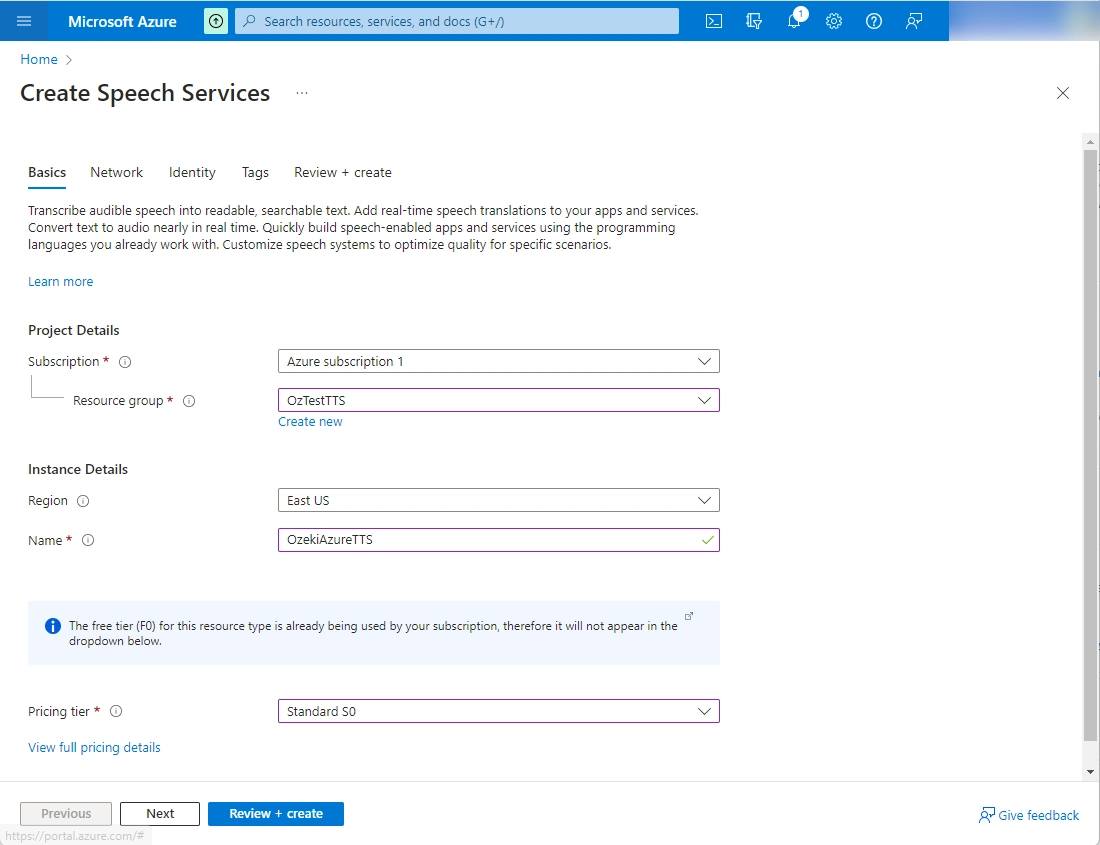
Create a Speech resource in the Azure portal.
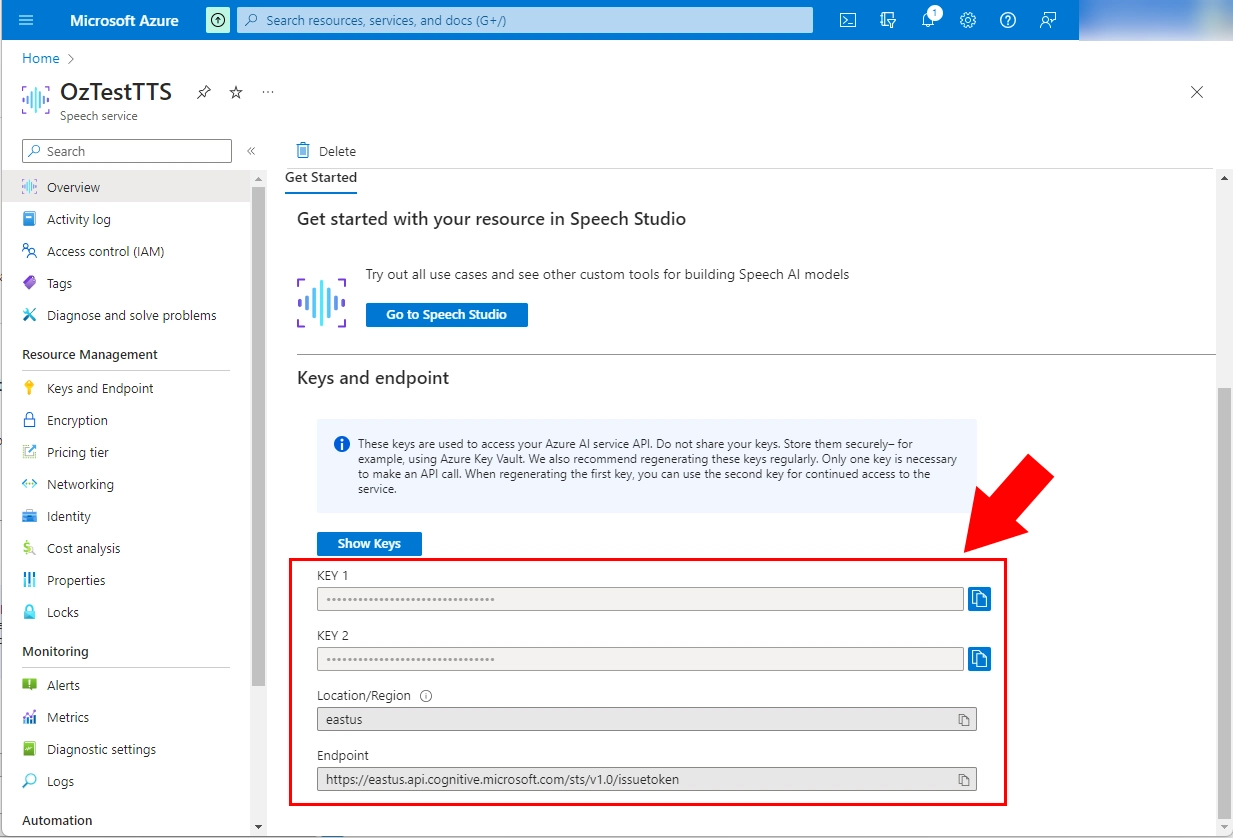
After your Speech resource is deployed, select Go to resource to view and manage keys. For more information about Azure AI services resources, see Get the keys for your resource.
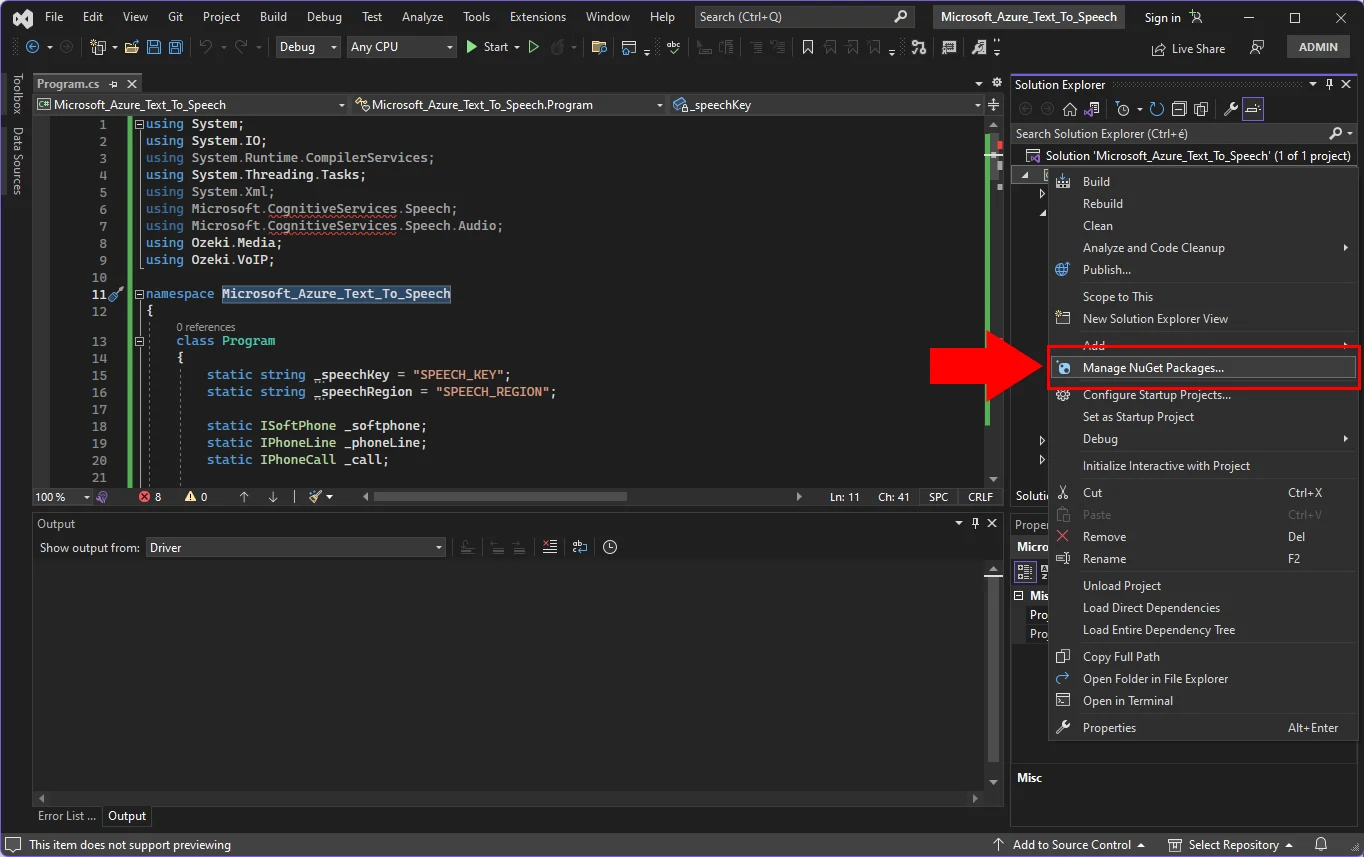
Install the Speech SDK for C#
In Solution Explorer, right-click the Microsoft_Azure_Text_To_Speech project, and then select Manage NuGet Packages to show NuGet Package Manager.
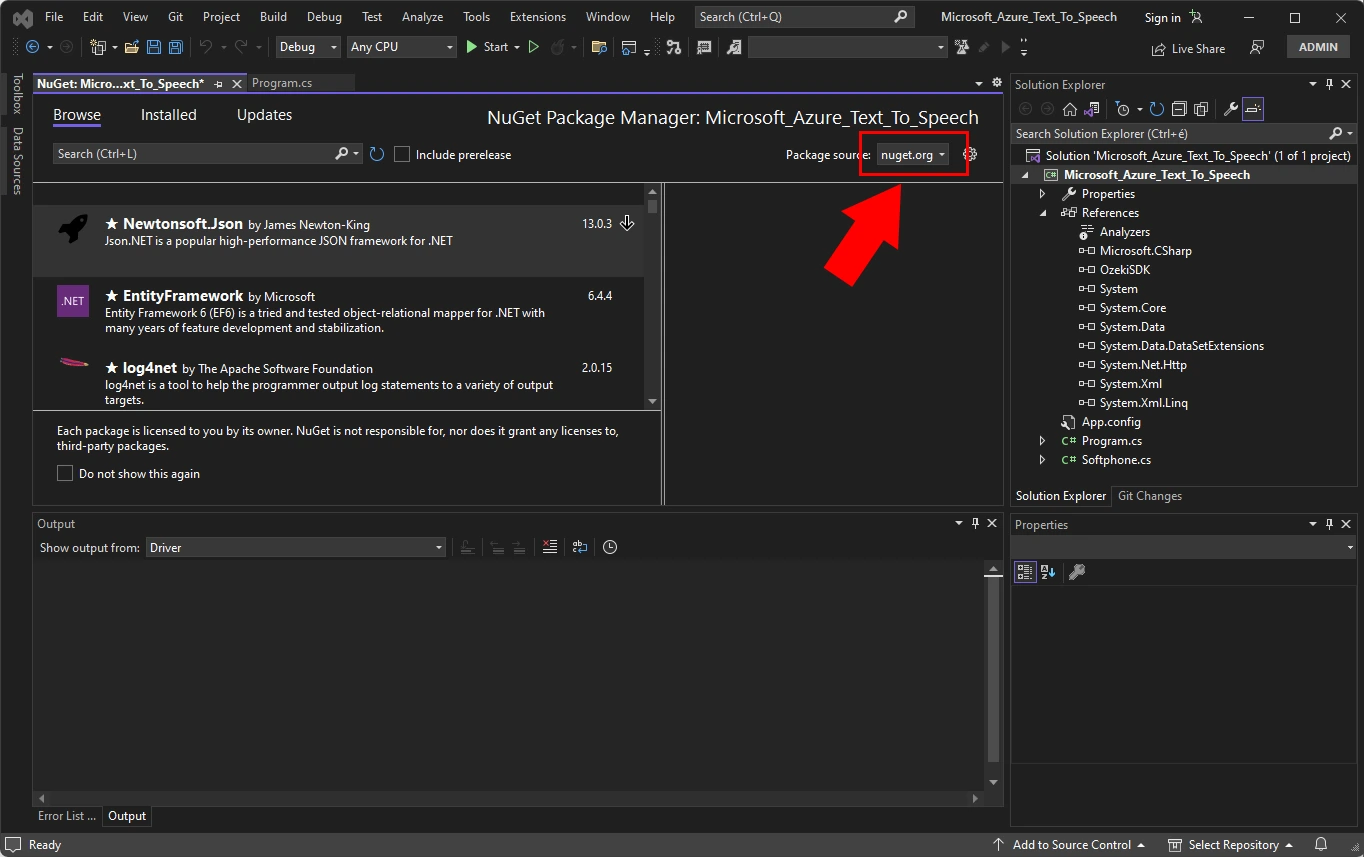
In the upper-right corner, find the Package Source dropdown box, and make sure that nuget.org is selected.
In the upper-left corner, select Browse.
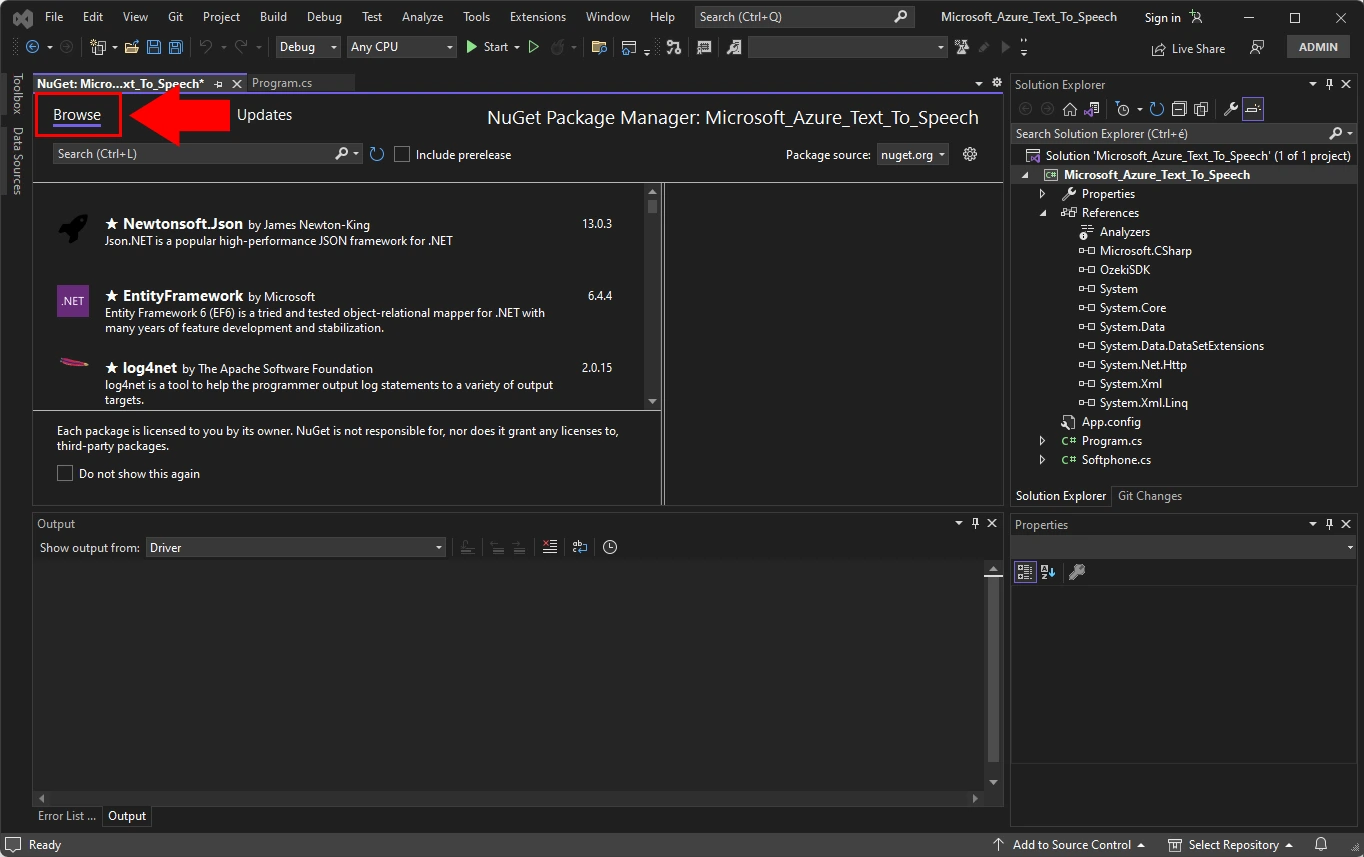
In the search box, enter Microsoft.CognitiveServices.Speech and select Enter.
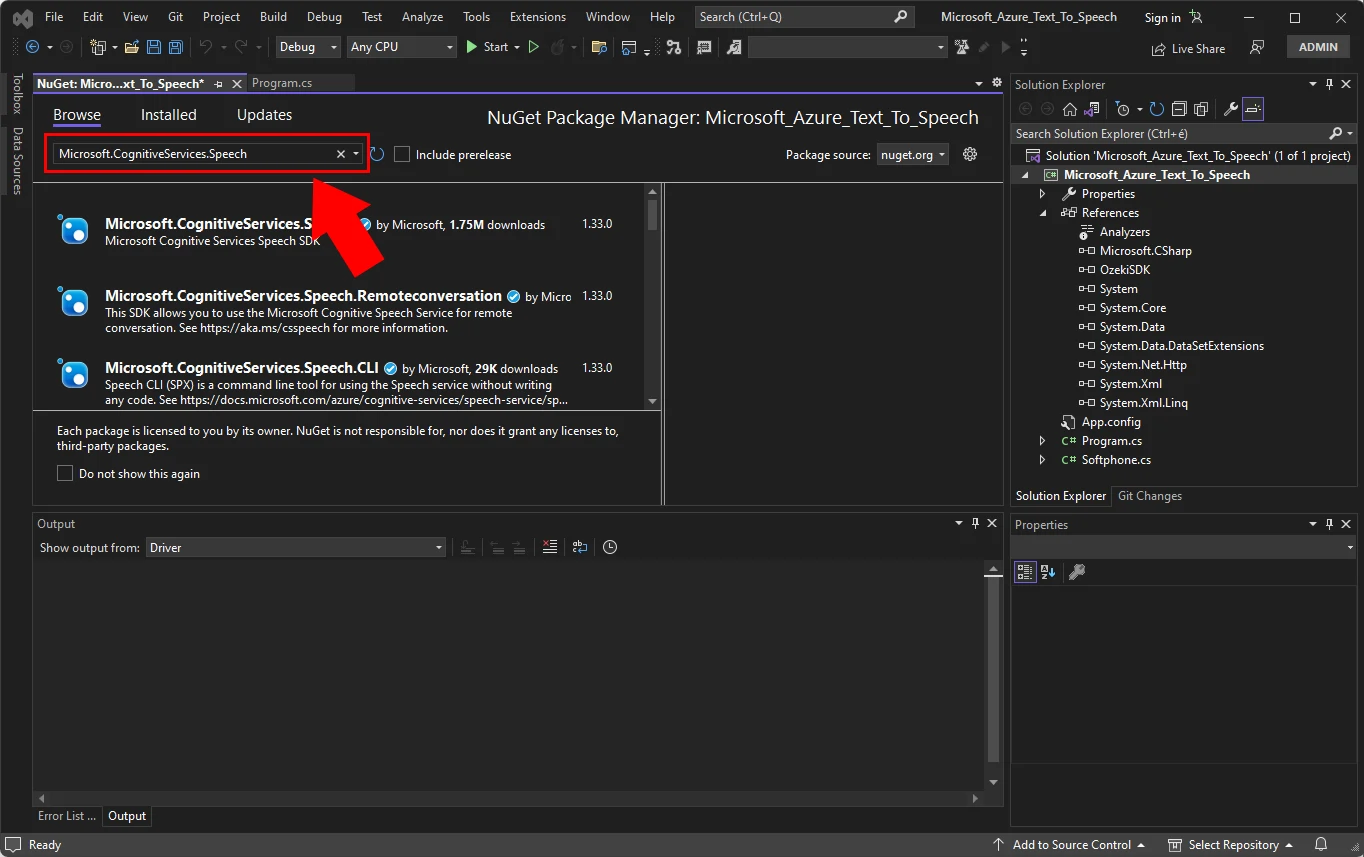
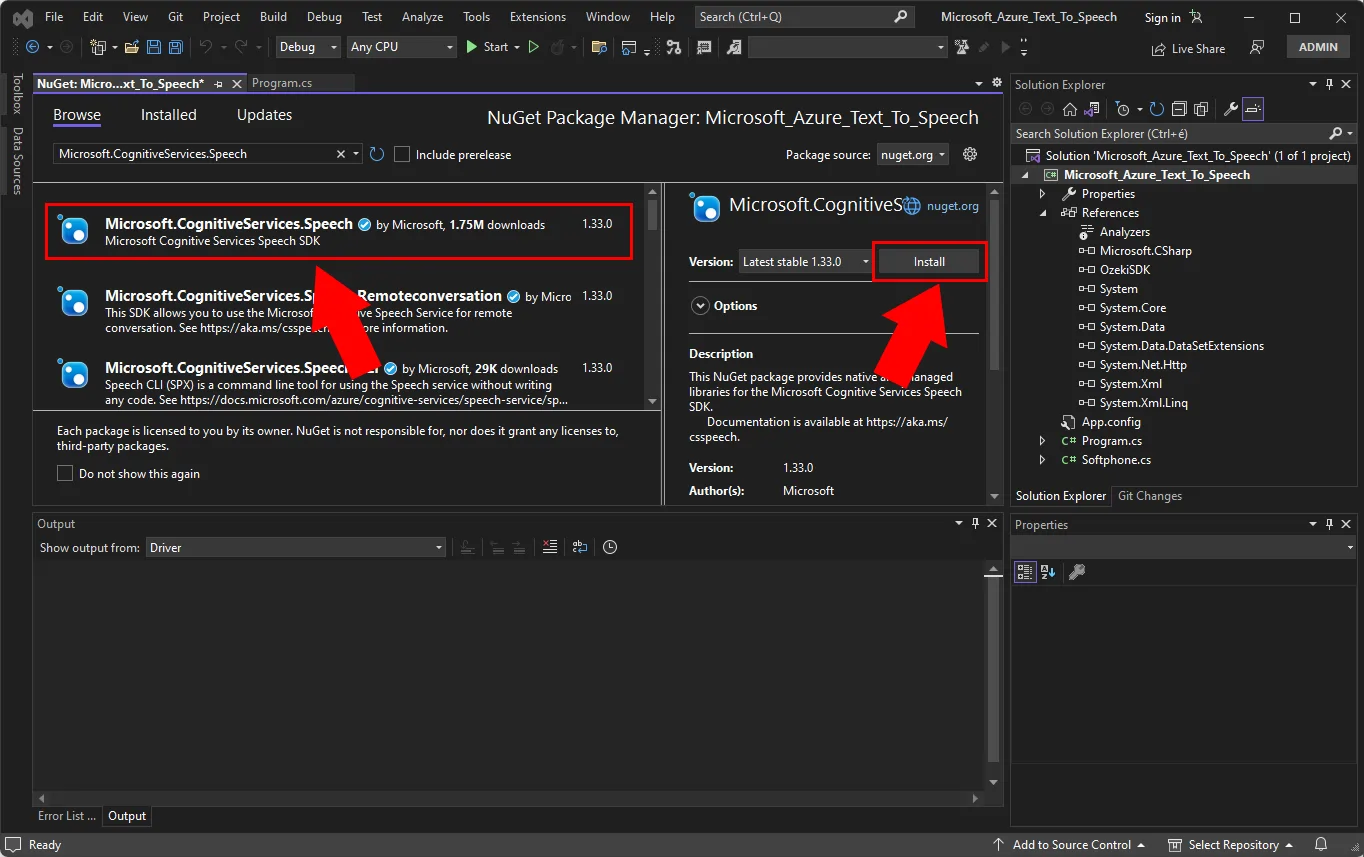
From the search results, select the Microsoft.CognitiveServices.Speech package, and then select Install to install the latest stable version.
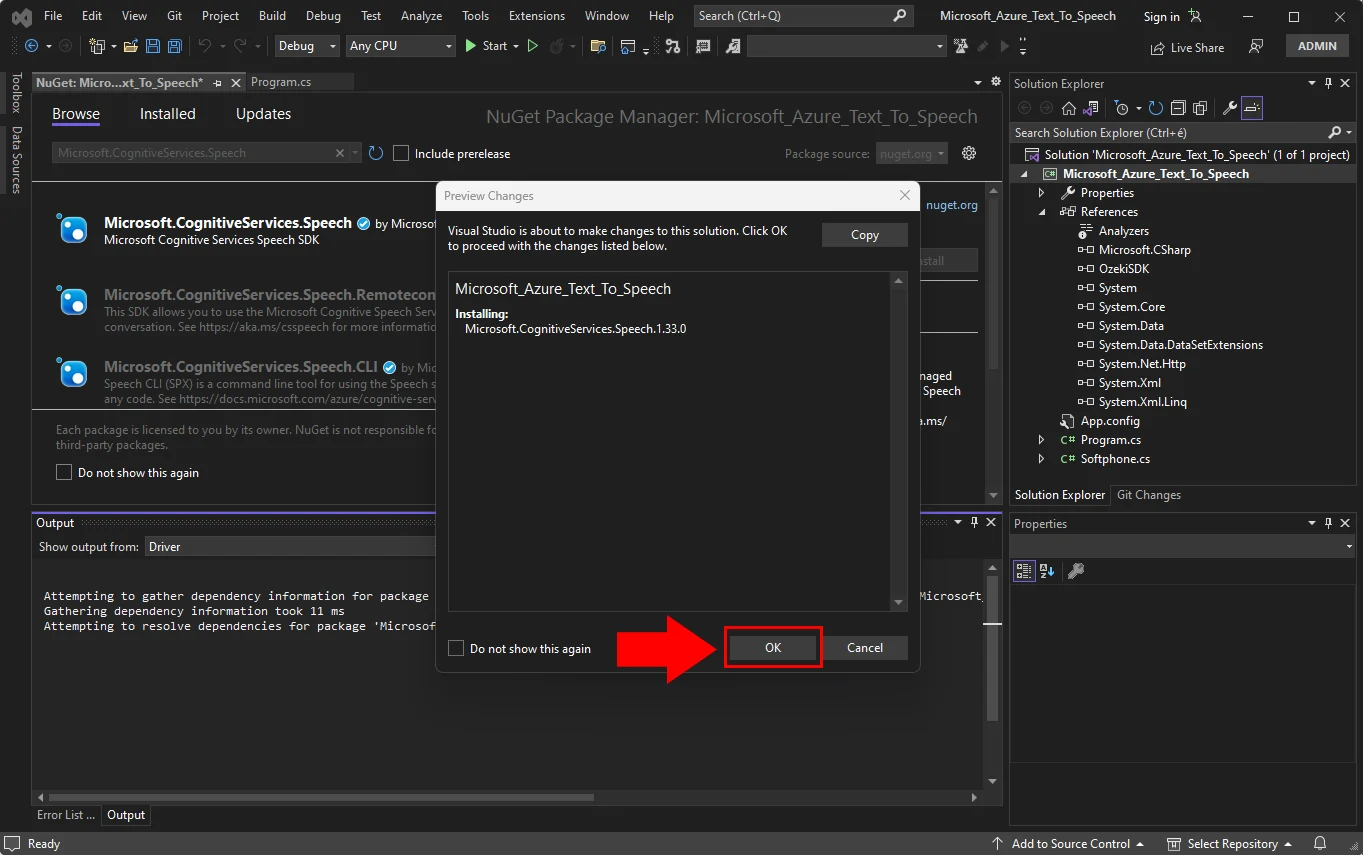
Accept all agreements and licenses to start the installation.
After the package is installed, a confirmation appears in the Package Manager Console window.
Rings VoIP phone and after picking up the phone
a text to speech message will be read (C# example)
using System;
using System.IO;
using System.Runtime.CompilerServices;
using System.Threading.Tasks;
using System.Xml;
using Microsoft.CognitiveServices.Speech;
using Microsoft.CognitiveServices.Speech.Audio;
using Ozeki.Media;
using Ozeki.VoIP;

namespace Microsoft_Azure_Text_To_Speech
{
    class Program
    {
        static string _speechKey = "SPEECH_KEY";
        static string _speechRegion = "SPEECH_REGION";

        static ISoftPhone _softphone;
        static IPhoneLine _phoneLine;
        static IPhoneCall _call;

        static MediaConnector _connector;
        static PhoneCallAudioSender _mediaSender;

        static void Main(string[] args)
        {
            _softphone = SoftPhoneFactory.CreateSoftPhone(5000, 10000);

            var registrationRequired = true;
            var userName = "112";
            var displayName = "112";
            var authenticationId = "112";
            var registerPassword = "112";
            var domainHost = "192.168.115.60";
            var domainPort = 5060;
            var account = new SIPAccount(registrationRequired, displayName, userName, authenticationId, registerPassword, domainHost, domainPort);

            _mediaSender = new PhoneCallAudioSender();
            _connector = new MediaConnector();

            RegisterAccount(account);

            Console.ReadLine();
        }

        static void RegisterAccount(SIPAccount account)
        {
            try
            {
                _phoneLine = _softphone.CreatePhoneLine(account);
                _phoneLine.RegistrationStateChanged += PhoneLine_RegistrationStateChanged;
                _softphone.RegisterPhoneLine(_phoneLine);
            }
            catch (Exception ex)
            {
                Console.WriteLine("Error during SIP registration: " + ex);
            }
        }

        static void PhoneLine_RegistrationStateChanged(object sender, RegistrationStateChangedArgs e)
        {
            if (e.State == RegState.NotRegistered || e.State == RegState.Error)
            {
                Console.WriteLine("Registration failed!");
                return;
            }

            if (e.State == RegState.RegistrationSucceeded)
            {
                Console.WriteLine("Registration succeeded - Online!");
                CreateCall();
                return;
            }
        }

        static void CreateCall()
        {
            var numberToDial = "110";
            _call = _softphone.CreateCallObject(_phoneLine, numberToDial);
            _call.CallStateChanged += Call_CallStateChanged;
            _call.Start();
        }

        static void Call_CallStateChanged(object sender, CallStateChangedArgs e)
        {
            Console.WriteLine("Call state: {0}.", e.State);

            if (e.State == CallState.Answered)
                Task.Run(SetupTextToSpeech);
        }

        static async void SetupTextToSpeech()
        {
            var speechConfig = SpeechConfig.FromSubscription(_speechKey, _speechRegion);
            speechConfig.SpeechSynthesisVoiceName = "en-US-JennyNeural";
            speechConfig.SetSpeechSynthesisOutputFormat(SpeechSynthesisOutputFormat.Raw16Khz16BitMonoPcm);

            var myBuffer = new MyBuffer();
            var pullStream = AudioOutputStream.CreatePushStream(myBuffer);
            var audioConfig = AudioConfig.FromStreamOutput(pullStream);

            var speechSynthesizer = new SpeechSynthesizer(speechConfig, audioConfig);
            var speechSynthesisResult = await speechSynthesizer.SpeakTextAsync("Test message from microsoft azure text to speech api through voip call.");

            myBuffer.InnerStream.Position = 0;//You need to set stream position to 0 before passing it to RawStreamPlayback
            var playback = new RawStreamPlayback(myBuffer.InnerStream, new WaveFormat(16000, 16, 1));

            _mediaSender.AttachToCall(_call);
            _connector.Connect(playback, _mediaSender);
            playback.Start();
        }

        class MyBuffer : PushAudioOutputStreamCallback
        {
            public readonly MemoryStream InnerStream = new MemoryStream();

            public override uint Write(byte[] dataBuffer)
            {
                InnerStream.Write(dataBuffer, 0, dataBuffer.Length);
                return (uint)dataBuffer.Length;
            }

            public override void Close()
            {
                InnerStream.Close();
            }
        }
    }
}
More information
- How to build a softphone voip sip client
- Register to SIP PBX
- Voip softphone development
- How to encrypt voip sip calls with sip encryption
- How to encrypt voip sip calls with rtp encryption
- How to ring a sip extension csharp example for sip invite
- How to make a sip voice call using csharp
- Voip multiple phone lines
- How to send stream of voice data into call using csharp microphone
- How to receive voice from SIP voice call using csharp speaker
- How to make conference voice call using voip sip
- How to play an mp3 file into a voice call using csharp
- How to convert text to speech and play that into a call using csharp
- How to use Microsoft Speech Platform 11 for TTS and STT
- How to record voip sip voice call
- How to accept incoming call using csharp
- How to reject incoming call using csharp
- How to read Headset buttons using Bluetooth
- How to implement auto answer using csharp
- How to recognize incoming voice using speech to text conversion
- Voip forward call
- Voip blind transfer
- Voip attended transfer
- Voip do not disturb
- Voip call hold
- SIP Message Waiting Indication
- Voip DTMF signaling
- How to work with sip and sdp in voip sip calls
- How to work with rtp in voip sip calls
- How to make voip video calls in csharp
- Voip video codec
- Shows how to use SpeechToText Google API
- How to convert Text to Speech using C# and Google
- Azure Text-to-Speech