Ozeki VoIP SDK - Product Guide
Developers Guide
Navigation in the IVR tree using DTMF commands
Explanation
Prerequisities
![]() |
Download: | DTMFIVRTreeNav.zip |
Ozeki VoIP SIP SDK is a remarkable help in developing your IVR solution. It also greatly accelerates development when it comes to DTMF navigation in IVR tree structure. Below you can find a detailed guide that explains with source codes how you can implement DTMF navigation with Ozeki SIP SDK.
Introduction
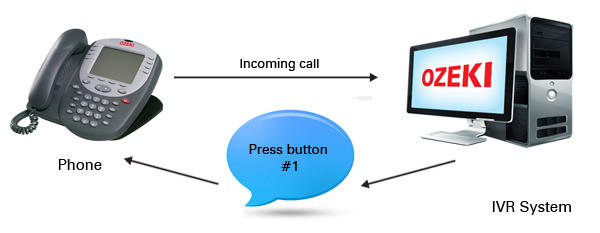
Interactive Voice Response (IVR) systems use a tree structured menu that can be navigated by using DTMF (Dual-tone multi-frequency) signals. DTMF signals are sent to a telephoning client when the remote user presses a button on the telephone or softphone keypad.
DTMF signals are special sound frequencies that can be recognized in the VoIP client and if there is an implemented function for the use of these sounds, the VoIP client can use them for any purpose.
Figure 1 - VoIP IVR DTMF navigation
In IVR systems the caller clients can navigate in the menu tree by using DTMF signals. This operation usually made by the IVR server playing an audio that instructs the user to press certain keypad buttons in order to get to the answer for their problem. When the user pressed the right button, the IVR system enters the appropriate branch of the menu tree and the instruction process continues. This process continues until the user reaches the bottom of the menu tree or presses a button for getting into connection with a human operator if possible.
Ozeki VoIP SIP SDK provides all the support for implementing an IVR system that can be navigated by DTMF signals. You only need to use the provided classes and methods and you will soon have your own IVR server.
The following program code uses the background support of Ozeki VoIP SIP SDK, therefore you will need to download and install the SDK on your computer before starting to use the program code. You will also need to have Visual Studio 2010 or compatible IDE and .NET Framework installed on your system, as the program code below is written in C# language.
This example program demonstrates how you can build and navigate in an IVR tree structure with DTMF signals. The program automatically accepts the incoming calls and uses text to speech conversion for reading the actual tree node's messages.
The Graphical User Interface of the program is shown in Figure 2. The GUI shows the whole IVR tree structure in a TreeView object. The currently selected node appears on the GUI with red font color.
Figure 2 - The user interface of the IVR example program
The example program receives the softphone registration data from an application configuration
file seen in Code 2.
Note that you need to set your SIP account ant PBX
IP information here if you want your program work properly.
<?xml version="1.0" encoding="utf-8" ?>
<configuration>
<appSettings>
<add key="IsRegRequired" value="true"/>
<add key="displayname" value="oz879"/>
<add key="username" value="oz879"/>
<add key="registername" value="oz879"/>
<add key="regpass" value="oz879"/>
<add key="domainhost" value="192.168.112.100"/>
<add key="port" value="5060"/>
<add key="nat" value="0"/>
</appSettings>
</configuration>
Code 1 - PBX registration information
Code 2 shows the method that handles the PBX registration. Getting data from the application configuration file is really simple with the ConfigurationManager.AppSettings object. This can directly reach the data in the app.config file specified by the key elements. This method needs to be called directly after the softphone initialization as it needs an initialized softphone object to work properly.
private void register()
{
try
{
var cm = ConfigurationManager.AppSettings;
IsRegRequired = bool.Parse(cm["IsRegRequired"]);
displayname = cm["displayname"];
username = cm["username"];
registername = cm["registername"];
regpass = cm["regpass"];
domainhost = cm["domainhost"];
port = Int32.Parse(cm["port"]);
switch (Int32.Parse(cm["nat"]))
{
case 0:
natTraversal = NatTraversalMethod.None;
break;
case 1:
natTraversal = NatTraversalMethod.STUN;
break;
case 2:
natTraversal = NatTraversalMethod.TURN;
break;
}
SIPAccount sa = new SIPAccount(IsRegRequired, displayname, username, registername, regpass, domainhost, port);
NatConfiguration nc = new NatConfiguration(natTraversal);
phoneLine = softPhone.CreatePhoneLine(sa, nc);
phoneLine.PhoneLineStateChanged += new EventHandler<VoIPEventArgs<PhoneLineState>>(phoneLine_PhoneLineInformation);
softPhone.RegisterPhoneLine(phoneLine);
}
catch (Exception ex)
{
...
}
}
Code 2 - Gaining registration data from the app.config file
The IVR tree will be built up in this example program from an xml file. The structure of this file can be seen in Code 3. The tree node contains the name element that will be shown on the GUI, the message that will be read out by a text to speech engine, the signal element that specifies the DTMF signal that needs to be received for reaching the node and some (or none) child nodes.
<?xml version="1.0" encoding="utf-8" ?>
<node>
<name>Name</name>
<message>Message</message>
<signal>signal</signal>
<children>
<node>...
</children>
</node>
Code 3 - The IVR tree information
The IVR example program uses a TreeView object for displaying the tree on the GUI. This object contains TreeNode objects for the tree structure. In the example program, there is a special class defined, that will store the logical structure of the IVR tree. This class (Code 4) contains the TreeNode object, but also stores the message and the signal information gained from the .xml file. The IVRNode objects also store the children and the parent nodes' references. This will be important when you want to navigate in the tree structure.
class IVRNode
{
public TreeNode treeNode;
IVRNode parent;
Dictionary<int, IVRNode> children = new Dictionary<int,IVRNode>();
string name;
public string message;
public IVRNode(string name, string message)
{
this.name = name;
this.message = message;
this.parent = null;
treeNode = new TreeNode(name);
}
public IVRNode(string name, string message, IVRNode parent)
{
this.name = name;
this.message = message;
this.parent = parent;
treeNode = new TreeNode(name);
}
public void AddChild(int signal, IVRNode child)
{
children.Add(signal, child);
treeNode.Nodes.Add(child.treeNode);
}
public IVRNode getChild(int signal)
{
if (children.ContainsKey(signal))
return children[signal];
return null;
}
}
Code 4 - The IVR tree node class
The .xml file that stores the IVR menu information is handled in a parser class that only contains a static field for the .xml file and a static method that parses the file (Code 5).
The parsing method is a recursive one that builds up the whole IVR tree of IVRNode objects. It is a really compact solution that can handle an .xml file of the same structure of any size.
class TreeXMLParser
{
public static XElement treedoc = XElement.Load("../../TreeData.xml");
public static IVRNode parse(XElement element, IVRNode parentNode)
{
IVRNode node = new IVRNode(element.Element("name").Value.ToString(), element.Element("message").Value.ToString(), parentNode);
foreach (XElement childnode in element.Element("children").Elements("node"))
{
try
{
node.AddChild(Int32.Parse(childnode.Element("signal").Value.ToString()), parse(childnode, node));
}
catch (Exception ex)
{
MessageBox.Show(String.Format("error {0}", ex), "error", MessageBoxButtons.OK, MessageBoxIcon.Error);
}
}
return node;
}
}
Code 5 - The XML parser
In the softphone class the tree building is made by the method shown in Code 6. This method starts the XML parsing and then builds up the TreeView that will be displayed on the GUI. When the tree is built up, only the root element needs to be added to the TreeView, the others will be automatically set in the right structure.
private void buildTree()
{
root = TreeXMLParser.parse(TreeXMLParser.treedoc, null);
treeView1.Nodes.Add(root.treeNode);
selectedNode = root;
selectedTreeNode = root.treeNode;
try
{
treeView1.SelectedNode = selectedTreeNode;
treeView1.SelectedNode.ForeColor = Color.Red;
}
catch (Exception)
{
MessageBox.Show("Error", "Error", MessageBoxButtons.OK, MessageBoxIcon.Error);
}
}
Code 6 - Building the IVR tree
This example program is basically a softphone, but it works a bit different. You cannot, for example, start a call with it, and an incoming call is automatically accepted. In the case of a traditional softphone the input tool is the microphone that is connected to the PhoneCallAudioSender object and the output tool is a speaker that is connected to the PhoneCallAudioReceiver.
In this example program the input tool will be a TextToSpeech object that is connected to the audio sender. The audio receiver is not connected to any tools as you do not need to hear the other side in this example, but the receiver needs to be attached to the call in this case too, as there will be received data that need to be handled (the DTMF signals).
case CallState.InCall:
connector.Connect(ivrReader, mediaSender);
mediaSender.AttachToCall(call);
mediaReceiver.AttachToCall(call);
ivrReader.AddAndStartText(selectedNode.message);
break;
Code 7 - Reading the IVR message at the first time
The tree navigation is made in the call_DtmfReceived method (Code 7). This method is the event handler for the DTMF signal receiving, therefore this is the right place to handle the DTMF navigation.
The class always stores the actually selected IVRNode that stores in a Dictionary object all its children. When a DTMF signal is received, the method checks if it is a star of a hash mark as they hold special meaning. Pressing the star will always restart the actual tree node message, pressing the hash will navigate back to the root if you are not there already.
When the caller pressed a number key on the keypad, the method tries to get the actual node's child that is attached to that DTMF signal. If there is no such child, the message will go on without any jumping in the tree structure. If the incoming DTMF signal refers to a valid child, the program will jump in the tree structure to the specified child and its message will be started. The GUI will be also refreshed for showing the latest selected node.
private void call_DtmfReceived(object sender, VoIPEventArgs<DtmfInfo> e)
{
DtmfInfo dtmfInfo = e.Item;
InvokeGUIThread(() =>
{
label1.Text = String.Format("DTMF signal received: {0} ", dtmfInfo.Signal.Signal);
});
//you can restart the actual message by pressing star
if (dtmfInfo.Signal.Signal == 10)
{
ivrReader.StopStreaming();
ivrReader.AddAndStartText(selectedNode.message);
}
//pressing hash gets you back to the main menu
if (dtmfInfo.Signal.Signal == 11 && !atRoot)
{
atRoot = true;
selectedNode = root;
selectedTreeNode = root.treeNode;
InvokeGUIThread(() =>
{
treeView1.SelectedNode.ForeColor = Color.Black;
treeView1.SelectedNode = selectedTreeNode;
treeView1.SelectedNode.ForeColor = Color.Red;
});
ivrReader.StopStreaming();
ivrReader.AddAndStartText(selectedNode.message);
}
//stepping into a submenu if exists
if (selectedNode.getChild(dtmfInfo.Signal.Signal) != null)
{
atRoot = false;
ivrReader.StopStreaming();
selectedNode = selectedNode.getChild(dtmfInfo.Signal.Signal);
selectedTreeNode = selectedNode.treeNode;
InvokeGUIThread(() =>
{
treeView1.SelectedNode.ForeColor = Color.Black;
treeView1.SelectedNode = selectedTreeNode;
treeView1.SelectedNode.ForeColor = Color.Red;
});
ivrReader.AddAndStartText(selectedNode.message);
}
}
Code 8 - Incoming DTMF signal handling
A DTMF navigated IVR tree structure is the easiest and most simple way for the IVR system building purpose. This example program showed a possible solution for implementing this system. The program used XML file parsing, application configuration file and a TreeView object for reaching the goal and the solution does exactly what you expect from an IVR system.
If you have any questions or need assistance, please contact us at info@voip-sip-sdk.com
You can select a suitable Ozeki VoIP SIP SDK license for building your IVR system on Pricing and licensing information page
Related Pages
- Quick start guide
- Download Ozeki VoIP SIP SDK form the Ozeki VoIP SIP SDK download page
- You can find licensing information of Ozeki VoIP SIP SDK on Pricing and licensing information page
| Operating system: | Windows 8, Windows 7, Vista, 200x, XP |
| System memory: | 512 MB+ |
| Free disk space: | 100 MB+ |
| Development environment: | Visual Studio 2010 (Recommended), Visual Studio 2008, Visual Studio 2005 |
| Programming language: | C#.NET |
| Supported .NET framework: | .NET Framework 4.5, .NET Framework 4.0, .NET Framework 3.5 SP1 |
| Software development kit: | OZEKI VoIP SIP SDK(Download) |
| VoIP connection: | 1 SIP account |
INTERMEDIATE
VoIP technology walkthrough
Softphone development
Webphone development
Mobile development
Voice recording
GETTING AROUND
Sitemap
Search the manual
API documentation
FAQ
Appendix


