


How to create and manage call queues
When you decide to use Ozeki VoIP SIP SDK for building your call center, you will also have the great option to create and manage call queues to make your system more efficient. This article presents how you can create and handle call queues with Ozeki SIP SDK.
What is call queue?
Call centers usually receive more incoming calls than the number of call center agents who can accept them. It means that without a complex system several calls can be missed because of lack of resources. The solution for this situation is a system that ensures the call center server can handle all incoming calls in a queued system. Incoming calls are queued on the basis of the routing type that is used by the server for distributing calls.
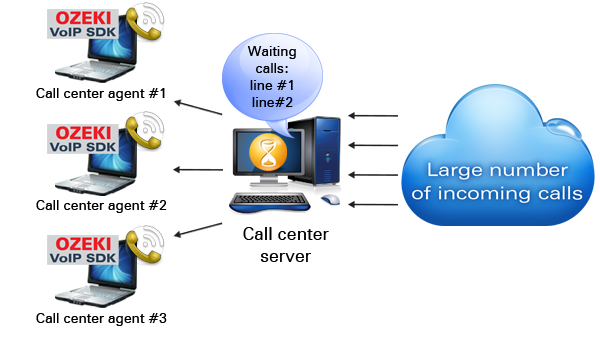
If the server uses simple call distribution, there is no need to have more than one calling queue. The incoming calls are put at the end of the queue and when a call center agent gets available, the first call in the queue is transferred to that agent.
If the call center server uses skill based call routing, however, more call queues need to be used. In this case there can be a queue for all field of expertise or even for every single agent. This way the skill based routing procedure decides which group of agents should receive the actual call and it puts the call to the appropriate queue. If the call queue belongs to more than one call center agents, the call will be distributed by a simple call routing within the group.
Call queue implementation in C#
Assuming that you have a call center solution, that is basically an advanced multichannel softphone, you can easily define a call queue in the server code. The call queue can be a simple List object from that you can choose the next call to transfer to an operator.
When a call cannot be transferred to an agent - for example when there is no available agents - the call is set to hold and put into the call queue. In this case the call center plays a message to the customer about the waiting time.
When an operator becomes available, the first call in the queue will be transferred to that operator.
If you want learn more about call queue implementation go to the Advanced call queue article.
Training guides, simple examples
If you are looking for a detailed guide, you can find it in the Training section. Here are several example codes with which you can get to know and try these functionalities.
Summary
This article shares how to manage call queues using Ozeki VoIP SIP SDK. If you have read through this page carefully, you already have all the knowledge you need to start your own solution.
As you are now familiar with all the terms concerning this topic, now it is time to take a step further and explore what other extraordinary solution Ozeki VoIP SIP SDK can provide to you.
Select a suitable Ozeki VoIP SIP SDK license for your project at: Pricing and licensing information
Related Pages
More information