High performance VoIP SDK for .Net developers

VoIP SIP SDK

Detect incoming phone call and display information based on caller id

Explanation

Prerequisities

Download: 40_CustomerIdentification.zip

This article is a brief introduction about detecting incoming calls in call centers in relation with Ozeki VoIP SIP SDK. After reading through this page you will be fully familiar with all the essential terms concerning incoming call detection and what you will need for creating your own solution using Ozeki VoIP SIP SDK.

Introduction

In an ordinary telephone system the identification of the caller is based upon the phone number they use. This identification can be done in VoIP solutions too, but is usually based upon the caller's ID, that can be a SIP account, an alias or in some cases even a phone number.

The caller's identification can be implemented in many ways. In case of simple VoIP communication system, like a softphone the identification is made upon the contact information of the users. In a call center it is a bit more difficult as the customers who call the call center can use different solutions, they can even call from an ordinary telephone set through the PSTN.
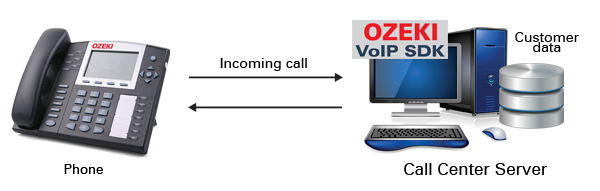

Figure 1 - VoIP incoming call detection

In case of a call center the caller information can be stored in database tables, given the large number of information to be stored. This solution is the simplest and the easiest to handle as databases are designed for supporting sort and lookup methods.

When a customer calls a call center the server application can make a database query for the caller information and can decide on the next step according to the result. In some cases the call center agents can be assigned to certain customers, for example, in this case the caller can be directed to the proper agent according to the database information.

Ozeki VoIP SIP SDK provides the basic background for caller identification, you can use the provided methods to get the caller's basic data and you can use it according to your actual business logic in your call center solution.

The example program you can download from this page is a basic call center solution that stores the customer data in a database and displays that data in a window when an incoming or outgoing call is made. You can also add notes to the customer datasheet during the call and all the notes you type in and save will be saved into the database too.

In this article the part of the example application will be explained that does the datasheet displaying for the incoming calls. If you want to know more about the other parts of the example program, you can find information about them in the following articles:

The basic softphone functions are the same as in the case of a simple softphone application, it is only extended with database handling and customer data display. In the case of an incoming call, the caller's number will be stored and the method shown in Code 1 will be invoked.

if (textBox1.Text != String.Empty)
{
        connection.Open(); // Does nothing if already open.
        CustomerDatasheet datasheet = connection.getCustomerDatasheet(textBox1.Text);
        if (datasheet != null && new CustomerDataForm(datasheet).ShowDialog() == System.Windows.Forms.DialogResult.OK)
            connection.saveCustomerDatasheet(datasheet);
}

Code 1 - Opening a customer data form from the database

The CustomerDataSheet is a class that stores the information retrieved from the database about the customer that calls the call center, the CustomerDataForm is the one that displays this data in a window (Figure 2).


Figure 2 - The customer data form

The customer data is retrieved from the database by calling the method shown in Code 2. This method is defined in the DatabaseConnection class and performs the SELECT commands needed for retrieving the proper data.

public CustomerDatasheet getCustomerDatasheet(string PhoneNumber)
{
    DbDataReader reader;
    Int64 id;
    string fullName;
    List<string> phoneNumbers = new List<string>();
    SortedDictionary<DateTime, string> notes = new SortedDictionary<DateTime, string>();
    string sql = string.Format("SELECT c.customer_id, c.fullname, n.phone FROM customer c INNER JOIN number n ON c.customer_id = n.customer_id WHERE n.phone = '{0}'", PhoneNumber);
    reader = this.CreateDbCommand(sql).ExecuteReader();
    if (!reader.Read())
    {
        return null;
    }
    id = (Int64)reader["customer_id"];
    fullName = (string)reader["fullname"];
    while (reader.Read())
    {
        phoneNumbers.Add((string)reader["phone"]);
    }
    reader.Close();

    reader = this.CreateDbCommand(string.Format("SELECT n.created, n.note FROM note n WHERE n.customer_id = {0} ORDER BY n.created ASC", id)).ExecuteReader();
    while (reader.Read())
    {
        notes.Add((DateTime)reader["created"], (string)reader["note"]);
    }
    reader.Close();

    return new CustomerDatasheet(id, fullName, phoneNumbers, notes);
}

Code 2 - Creating a customer data sheet from a database

When the data sheet is created, the proper data appear on the data form and you can also type in some noted during the call on the GUI. When you press the Save&Close button, your new notes will be stored in the database with the current time information (Code 3).

public void saveCustomerDatasheet(CustomerDatasheet customerDatasheet)
        {
            this.CreateDbCommand(string.Format("INSERT INTO note (customer_id, note, created) VALUES ({0}, '{1}', '{2}')", customerDatasheet.Id, customerDatasheet.Notes.Last().Value, customerDatasheet.Notes.Last().Key.ToString("yyyy-MM-dd HH:mm:ss"))).ExecuteNonQuery();
        }

Code 3 - Saving the customer data in the database

This example program also covers the topics of displaying customer data in case of outgoing calls, please check the above mentioned articles too to get a full picture about the example program.

This article introduced you the basic knowledge about incoming call detection in call centers and showed how Ozeki VoIP SIP SDK can help you to fulfill your wishes about this topic. If you have read through this page carefully, you already have all the knowledge you need to start on your own solution.

As you are now familiar with all the terms concerning this topic, now it is time to take a step further and explore what other extraordinary solution Ozeki VoIP SIP SDK can provide to you.

If you have any questions or need assistance, please contact us at info@voip-sip-sdk.com

You can select a suitable Ozeki VoIP SIP SDK license for your project on licensing page

Related Pages

Operating system: Windows 8, Windows 7, Vista, 200x, XP
System memory: 512 MB+
Free disk space: 100 MB+
Development environment: Visual Studio 2010 (Recommended), Visual Studio 2008, Visual Studio 2005
Programming language: C#.NET
Supported .NET framework: .NET Framework 4.5, .NET Framework 4.0, .NET Framework 3.5 SP1
Software development kit: OZEKI VoIP SIP SDK(Download)
VoIP connection: 1 SIP account