
Building an auto dialer system
In this article you will learn how to build an auto dialer system. Besides this, you can use DTMF response to transfer the call to an agent with support of Ozeki VoIP SIP SDK. Please use the source codes and their explanations to start building your autodialer using Ozeki SIP SDK.
What is autodialer?
An autodialer is an electronic device or software that automatically dials telephone numbers, and once a call has been answered, the autodialer either plays a recorded message or connects the call to a live person.
DTMF signaling in VoIP calls can be used for lots of purposes. You can use it, for example, for user authentication or IVR (Interactive Voice Response) tree navigation.
In a call center the IVR navigation can be the base of a call routing process. When the user gets to a point in an IVR tree when there is no other option to choose the call center server can transfer the call to an agent. This call transfer is made automatically therefore needs an autodialer system.
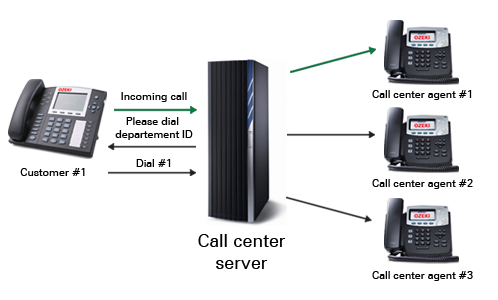
The call transfer process can be made according to the location of the caller in the IVR tree, for example is the customer has chosen that their problem is with service "A" then the call center can redirect the call to an expert of that service.
In most call center applications there are also a special keypress that redirects the call to a human operator any time. This is usually key #.
Ozeki VoIP SIP SDK provides all the magnificent background support that is needed for DTMF signal handling, therefore you can easily make a call center server that operates with DTMF signals.
Autodialers are used for specifying if the call was answered by a person. DTMF autodialers are one of the simplest solutions in this topic. You ask the remote peer that answered the call to press a key, and if the key is pressed, the call was answered by a human and need to be transferred to a call center agent, if not, the call was answered by a machine and needs to be ended.
Autodialer example in C#
You can find a detailed step-by-step guide with an example about developing Autodialer at the Autodialer article of the Training chapter.
You can also create Predictive Autodialer, which is able to connect the called clients to Ring Group member agents. You can find a well-detailed example about this feature at the Predictive Autodialer article.
You can select a suitable Ozeki VoIP SIP SDK license for building a DTMF autodialer on Pricing and licensing information page