High performance VoIP SDK for .Net developers

VoIP SIP SDK

Building a predictive dialer system (detect fax, busy signal, human voice)

Explanation

Prerequisities

Download: 22_AnswerMachineDetector.zip

Ozeki VoIP SIP SDK makes it easy to build your predictive dialer system. This article will guide you through the terms and main concepts of predictive dialers, then you can use the codes and explanations to start development.

Introduction

In case of call center systems the communication can be started from inside or outside the system. When an outside communication request is received it usually means that a customer calls the call center for some reason. However, there is also a possibility to start calls from inside the call center, for example in case of a callback request.

When a call center agent performs a callback towards a customer, the calling process also goes through the call center server, therefore there is the possibility to implement some checking processes on the server-side. These processes can be used for detecting the fact that the called customer's line is engaged or that a fax machine answered the call.
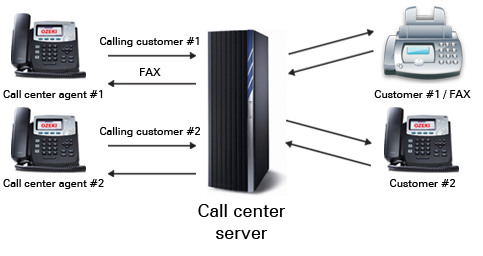

Figure 1 - VoIP predictive dialer

Call answering can be analyzed by a voice recognition system that should be able to differentiate the fax machine, a busy signal or the actual human voice. The call will be literally established between the agent and the customer only if a human voice answers the phone call.

In the following section you will learn how you can extend your Ozeki VoIP SIP softphone application with the support for predictive dialing. For this purpose, you will need to download and install Ozeki VoIP SIP SDK first.

Creating an AudioHandler for voice detection

Ozeki VoIP SIP SDK provides the possibility for extending the existing tools if you have some special goals to fulfill. In case of differentiating a human and machine answer you need to define a subclass for the Ozeki VoIP SIP SDK provided AudioHandler class (Code 1).

Your DetectorClass instance, as it is an AudioHandler, can be attached to an AudioReceiver object by a MediaConnector.

class DetectorClass : AudioHandler

Code 1 - You need to define a new AudioHandler for audio detection

In this new class you will need to implement the DataReceived() abstract method inherited from the AudioHandler class. This method is called when audio data is received from the AudioReceiver attached to the DetectorClass object (Code 2).

DetectorClass detector = new DetectorClass();
PhoneCallAudioReceiver audioReceiver = new PhoneCallAudioReceiver();
audioReceiver.AttachToCall(call);
MediaConnector.Connect(audioReceiver, detector);

Code 2 - You will need to attach your detector object to the audioReceiver object

The algorithm that needs to be implemented in your detector class' DataReceived() method is detailed in the next section. If you have implemented this detection algorithm, you will be able to differentiate a human voice and an answering machine with a very high detection rate.

The algorithm for answering machine detection

The detection rate can never be 100% as the answering machines no longer use standard signaling. In fact, you can make a VoIP softphone to behave as an answering machine with only playing a .wav audio file with a single sentence like: "I'm listening to you" and without any indication of a beep noise. Therefore modern answer machine detection algorithms do not operate with the detection of the beep signal but work according to the average human and machine telephoning behavior.

The following algorithm checks the length of the salutation and the silence after the salutation as a basis. It can be stated that an average human answers the phone by saying a simple "Hello" or maximum saying something like "Hello, this is Bob Smith speaking". After this the called person is waiting for an answer that means there will be a given length of silence after the salutation.

In case of an answering machine the salutation is usually longer like "Hello, you have called the Smith family. We are currently not at home, please leave us a message". After this there can be an actual beep signal but it is not necessary.

If you want to differentiate the human answer and the answering machine you will need to set some basic variables that define the minimum, maximum and recommended length of a given speech or silence period.

The detection algorithm needs some basic values that are shown in Table 1.

NameRecommended ValueDefault ValueDefinition
MinSilencePeriod375 (ms)608 (ms)Amount of time that the signal must be silent after speech detection to declare a live voice.
AnalysisPeriod2500 (ms)1592 (ms)Amount of time (from the moment the system first detects speech) that analysis will be performed on the input audio.
MaxTimeAnalysis3000 (ms)8000 (ms)The period in which CPAAnalysisPeriod must start and stop or voice will be declared. This timer starts at off-hook.
MinimumValidSpeechTime112 (ms)112 (ms)Amount of time that energy must be active before declared speech. Anything less is considered a glitch.

Table 1 - The key values for the answering machine detection algorithm

In the following examples (Figure 1 and Figure 2) you will see how the algorithm should work for the most effective detection rate.

Figure 2 shows the case when a person answers the phone. After the line is established and the call started, the algorithm waits for the incoming audio data. If the audio stream length exceeds the MinimumValidSpeechTime value, it is considered that some kind of speech is being received.

When the algorithm detects a silence period it measures its length and if this length exceeds the MinSilencePeriod value then the algorithm declares that the call was answered by a person.


Figure 2 - The detection algorithm in case of a human voice

It is essential that the detection only works till the length of the speech does not exceed the AnalysisPeriod. In the other case the algorithm declares that the call was answered by a machine (Figure 3).


Figure 3 - The detection algorithm in case of an answering machine.

Using the AnswerMachineDetector MediaHandler

Ozeki VoIP SIP SDK from version 9.1.0 provides an inbuilt MediaHandler class for answering machine detection that is based on the above mentioned algorithm. The example program you can download from this page shows how you can use an AnswerMachineDetector for your purpose to detect if the call was answered by a human or an answering machine.

As the AnswerMachineDetector is a standard MediaHandler class the usage of it is simple and similar to the other MediaHandler objects.

Code 3 shows how you can initialize an AnswerMachineDetector object. The detector needs to be subscribed to the DetectionCompleted event in order to realize when the detection session is over.

manchineDetector = new AnswerMachineDetector();

manchineDetector.DetectionCompleted += manchineDetector_DetectionCompleted;

Code 3 - The initialization of an AnswerMachineDetector

The event handler method (Code 4) can be really simple. In this example it only pops up a message box with the result of the detection. You can, of course, write more sophisticated event handler method that serves your exact purpose. For example, if you want to stop the call in case an answering machine answered it, you can write that code here.

void manchineDetector_DetectionCompleted(object sender, VoIPEventArgs e)
{
    InvokeOnGUIThread(()=> MessageBox.Show("Detection completed. Result: " + e.Item));

}

Code 4 - The event handler method for the DetectionCompleted event

In order to make the AnswerMachineDetector work in a phone call, you need to connect it to the audio receviver object that will be attached to the call (Code 5).

mediaConnector.Connect(phoneCallAudioReceiver, manchineDetector);

Code 5 - You need to connect the machine detector to the audio receiver object

The machine detector needs to be started when the call started (it is when the call state is InCall). This means that in the phoneCall_CallStateChanged method, you need to start the detector when the call is in InCall state (Code 6);

void phoneCall_CallStateChanged(object sender, VoIPEventArgs<CallState> e)
        {
            if (e.Item.IsInCall())
            {
                phoneCallAudioReceiver.AttachToCall(phoneCall);
                phoneCallAudioSender.AttachToCall(phoneCall);
                manchineDetector.Start();
            }

Code 6 - Starting the detection

The detection can be stopped when the detector is able to produce a result about the remote party but it also needs to be stopped when the call is ended, even if there is no detection result. The end of the call is specified by the Completed call state, therefore you need to stop the detection in the phoneCall_CallStateChanged event handler when the call state is Completed (Code 7).

else if (e.Item.IsCallEnded())
            {
                phoneCallAudioReceiver.Detach();
                phoneCallAudioSender.Detach();
                manchineDetector.Stop();
                ...

Code 7 - You need to directly end the detection if the call is ended

The other parts of the sample program remains the same as in case of a standard softphone, it means that you can paste the code for the detection into your already existing softphone application and it will be capable of detecting if an answering machine has answered the call.

If you have any questions or need assistance, please contact us at info@voip-sip-sdk.com

You can select a suitable Ozeki VoIP SIP SDK for building a predictive dialer on Pricing and licensing information page

Related Pages

Operating system: Windows 8, Windows 7, Vista, 200x, XP
System memory: 512 MB+
Free disk space: 100 MB+
Development environment: Visual Studio 2010 (Recommended), Visual Studio 2008, Visual Studio 2005
Programming language: C#.NET
Supported .NET framework: .NET Framework 4.5, .NET Framework 4.0, .NET Framework 3.5 SP1
Software development kit: OZEKI VoIP SIP SDK(Download)
VoIP connection: 1 SIP account