


ATA (FXS, FXO)
This article is a brief introduction about analog telephone adapters and the related terms and definitions in relation with Ozeki VoIP SIP SDK. After reading through this page you will be fully familiar with all the essential terms concerning ATA and what you will need for creating your own solution using Ozeki VoIP SIP SDK.
An analog telephone requires some special support in order to connect them into the VoIP system. Analogue phone lines use the ports: FXS, FXO. Foreign eXchange Subscriber (FXS) interface is the port that actually delivers the analog line to the subscriber. In other words it is the plug on the wall that delivers a dialtone, battery current and ring voltage. Foreign eXchange Office (FXO) interface is the port that receives the analog line. It is the plug on the phone or fax machine, or the plug(s) on your analog phone system. It delivers an on-hook/off-hook indication (loop closure). Since the FXO port is attached to a device, such as a fax or phone, the device is often called the FXO device. These two are always paired.
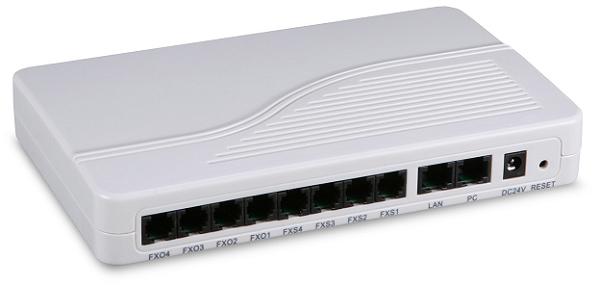
But if you would like to connect your traditional phone to the internet you need to make some little changes. To be precise, you will need some adapters. An adapter's task is to synchronize two (or more) technically different devices. The adapter, which is used to connect an analog phone to a VOIP phone system or to a VOIP provider is called ATA. ATA is the short term for Analogue Telephone Adapter (Figure 1). Since ATAs communicate directly with a VoIP server, they do not require any software to be run on a personal computer, such as a softphone.
This article introduced you the basic knowledge about analog telephone adapters and showed how Ozeki VoIP SIP SDK can help you to fulfill your goals. If you have read through this page carefully, you already have all the knowledge you need to start on your own solution.
As you are now familiar with all the terms concerning this topic, now it is time to take a step further and explore what other extraordinary solution Ozeki VoIP SIP SDK can provide to you.
If you have any questions or need assistance, please contact us at info@voip-sip-sdk.com
You can select a suitable Ozeki VoIP SIP SDK license for your project on Pricing and licensing information page
Related Pages
More information